Cloud Penetration Testing Guide on AWS & Azure: The Real Risks
Introduction
Most organizations move to AWS or Azure and assume the cloud provider handles security. That's one of the most expensive misunderstandings in modern infrastructure. AWS, Azure, and GCP invest billions securing their data centers, hypervisors, and global network fabric, but they stop there. What happens inside your account is entirely on you.
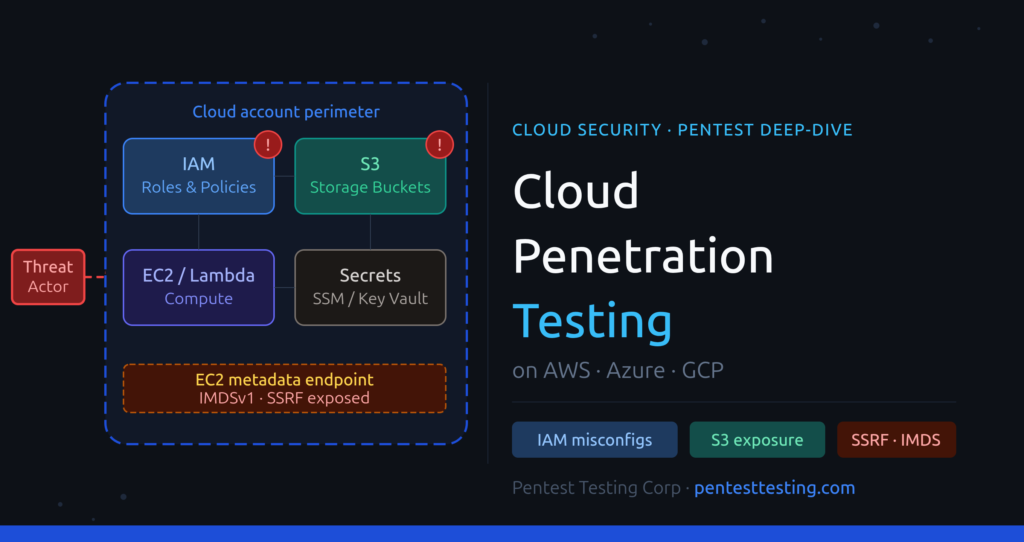
The 2024 Verizon Data Breach Investigations Report identified misconfiguration as a top cause of cloud security incidents for the third consecutive year. Attackers aren't waiting for sophisticated zero-days. They're finding the IAM role you forgot to restrict, the S3 bucket that's publicly readable, or the metadata endpoint your development team didn't know was reachable.
At Pentest Testing Corp, our team has conducted thousands of penetration tests across financial institutions, SaaS platforms, and e-commerce businesses worldwide. Our CEO, Md. Shofiur, holds certifications in web application penetration testing, API security, and ISO/IEC 27001 information security management. This post breaks down exactly what cloud penetration testing covers, what attackers actually exploit, and why your cloud configuration scanner isn't enough.
1. The Shared Responsibility Model: Where Cloud Security Actually Ends
Every major cloud provider publishes a shared responsibility model. The language differs slightly between AWS, Azure, and GCP, but the principle is consistent: the provider owns the physical infrastructure, the global network, and the managed service availability. You own everything built on top of it.
In practice, that means you're responsible for:
- Identity and access management (IAM) policies, roles, and permissions
- Network security groups, firewall rules, and VPC configurations
- Encryption at rest and in transit for data you store and process
- Public accessibility settings on storage buckets, databases, and snapshots
- Application-layer security across anything your team deploys
- Logging, monitoring, alerting, and incident detection
CISA's Cloud Security Technical Reference Architecture spells this out clearly, and AWS's own documentation is explicit about where provider responsibility ends. Yet in our engagements, we consistently find organizations that treat "running on AWS" as a security posture.
Why Default Configurations Are a Problem
Cloud providers optimize their defaults for usability and rapid onboarding, not for hardened security. S3 buckets created via CloudFormation templates can inherit permissive policies without any warning. IAM policies built incrementally by developers accumulate wildcard permissions over months. Security groups get opened for a debugging session and never closed.
These aren't theoretical risks. They're documented in every major cloud breach report published in the last five years, and we find versions of them in nearly every cloud assessment we run. The shared responsibility model doesn't just describe who does what, it describes where most breaches begin.
New on the blog: HIPAA Penetration Testing Guide – your roadmap to security testing for healthcare compliance.
2. How Attackers Exploit Cloud Environments
Understanding attacker techniques is essential for scoping a meaningful cloud penetration test. These aren't hypothetical scenarios, they're documented attack patterns from real-world breach reports and our own red team engagements across hundreds of cloud environments.
IAM Misconfiguration Attacks
IAM is the most consistently exploited layer in cloud environments. The attack patterns our team looks for include:
- Wildcard permissions in IAM policies where
Action: "*"orResource: "*"grants far broader access than intended - Privilege escalation paths via
iam:PassRole,iam:CreateAccessKey,iam:AttachUserPolicy, oriam:CreatePolicyVersion - Overpermissioned Lambda execution roles that can read from S3, write to DynamoDB, or retrieve secrets from SSM Parameter Store
- Stale access keys belonging to deprovisioned users, abandoned CI/CD pipelines, or forgotten automation accounts
A single IAM user with AdministratorAccess and a leaked access key is full account compromise. It's not a complex attack. It's a misconfiguration that gets exploited because nobody checked.
Public S3 Buckets and Blob Storage Exposure
AWS introduced S3 Block Public Access settings to address the epidemic of exposed buckets, but storage misconfigurations remain one of the most common findings in cloud assessments. We regularly encounter:
- Buckets with public-read ACLs containing source code, backups, or internal documentation
- Bucket policies that allow
s3:GetObjectfor"Principal": "*"at the object or prefix level - Presigned URLs with multi-day or multi-week expiry distributed externally
- Azure Blob Storage containers with anonymous access enabled at the container level
In virtually every cloud engagement we run, there's at least one storage exposure. It's rarely dramatic. It's usually a flag set incorrectly that nobody reviewed.
EC2 Metadata Service Exploitation (SSRF via IMDS)
The Instance Metadata Service (IMDS) on EC2 instances allows applications running on the instance to retrieve IAM role credentials. When an application is vulnerable to Server-Side Request Forgery (SSRF), an attacker can issue a request to http://169.254.169.254/latest/meta-data/iam/security-credentials/ and retrieve temporary AWS credentials with the permissions of the instance's attached role.
IMDSv2 requires a session-oriented token and mitigates most SSRF-to-IMDS attacks, but many environments still run IMDSv1, or allow v1 fallback because enforcing v2 broke a legacy application. We test for this in every AWS assessment.
Overpermissioned Service Accounts and Managed Identities
Azure Managed Identities and Service Principals accumulate permissions over the lifecycle of a project. A function app that needed read access to one storage account six months ago might now have Contributor rights at the subscription scope because someone took a shortcut. Compromise that function app, through a code injection or a dependency vulnerability, and you inherit everything that managed identity can touch.
3. Cloud Penetration Testing Methodology: Step by Step
Our cloud penetration testing methodology is structured, risk-based, and mapped to the OWASP Cloud Security Testing Guide and NIST SP 800-145. Here's how an engagement runs from kickoff to final report.
Step 1: Scoping and Pre-Engagement
Define the AWS accounts, Azure subscriptions, GCP projects, regions, and services in scope. Establish rules of engagement; testing windows, out-of-scope production systems, escalation paths if a critical issue is found during testing, and written authorization from the account owner. No cloud penetration test should begin without documented authorization.
Step 2: Reconnaissance and Asset Discovery
Enumerate all cloud resources: EC2 and VM instances, S3 and Blob containers, Lambda functions and Azure Function Apps, managed databases, API gateways, IAM users, roles, and policies. Tools like ScoutSuite, Prowler, and Steampipe provide automated enumeration coverage. We validate everything manually; automated tools miss context.
Step 3: IAM and Identity Analysis
Map all IAM policies, roles, trust relationships, and permission boundaries. Identify privilege escalation paths using Pacu (AWS) and BloodHound Enterprise for Azure AD. Document all entities with administrative or near-administrative effective permissions, including those that reach it through chained role assumptions.
Step 4: Network and Compute Assessment
Review security groups, NACLs, VPC peering configurations, and exposed services. Test for unnecessary public-facing ports, open RDP and SSH access from 0.0.0.0/0, and VPC route table misconfigurations. Check all EC2 instances for IMDSv1 exposure, and review VPC endpoints for overly permissive policies.
Step 5: Data Exposure Testing
Test all storage services for public accessibility, misconfigured ACLs, and unencrypted data. Check for publicly accessible RDS snapshots, unencrypted EBS volumes, and database instances with security groups allowing unrestricted inbound access. Validate that sensitive buckets have versioning, MFA delete, and server-side encryption enforced.
Step 6: Application and API Layer Testing
Cloud-native applications interact with cloud APIs continuously, and the application layer is often where initial access is gained. We test for injection vulnerabilities, broken authentication, and excessive cloud permissions granted to application identities. This integrates with our web application penetration testing and API penetration testing methodologies.
Step 7: Reporting and Remediation Support
Every finding is rated by severity (Critical, High, Medium, Low), mapped to a CVSS score, and accompanied by a reproduction path and concrete remediation guidance. We don't deliver a scanner export. We deliver exploitable evidence and clear fix instructions, along with a retest option to verify remediation.
4. AWS Penetration Testing: Key Attack Surfaces
AWS is the most widely deployed cloud platform, and its attack surface scales with adoption. Our cloud penetration testing service covers every major AWS service category, that page details engagement scope, timelines, and how to get started.
IAM Privilege Escalation Paths
AWS IAM privilege escalation is one of the highest-impact attack chains we find in AWS environments. Key escalation vectors include:
iam:CreatePolicyVersion: creates a new policy version granting arbitrary permissions to the attacker's useriam:PassRolecombined withec2:RunInstances, launches an EC2 instance with a privileged IAM role attached, then retrieves credentials via IMDSiam:AttachUserPolicy: attaches a managed admin policy directly to the attacker's IAM userlambda:CreateFunctioncombined withiam:PassRole, creates a Lambda function with a high-privilege execution role and invokes it to exfiltrate credentials
We use Pacu and custom enumeration scripts to identify all viable escalation paths from any given starting permission set, then manually verify each chain.
S3 Bucket Security Testing
S3 bucket testing goes beyond checking whether a bucket is public. Our assessment reviews bucket policies and ACLs for unintended access grants, Block Public Access settings at both the account and bucket level, cross-account bucket access configurations, server-side encryption enforcement with customer-managed versus AWS-managed keys, CloudTrail data event logging for all S3 API calls, and bucket versioning and MFA Delete status for sensitive data stores.
EC2, Lambda, and Serverless Security
For EC2 instances, we test user data scripts for hardcoded credentials, IMDSv1 reachability, and security group rules. For Lambda, we check execution role permissions against what the function actually needs, environment variable secrets visible in the console, function code for injection vulnerabilities, and event trigger configurations that might allow unauthenticated invocations.
5. Azure Security Testing: Key Attack Surfaces
Azure has a distinct identity architecture built around Microsoft Entra ID (formerly Azure AD), and its attack surface differs meaningfully from AWS. Many security teams that are comfortable with AWS IAM underestimate how quickly Azure AD misconfigurations can lead to tenant-wide compromise.
Azure AD and RBAC Misconfigurations
Azure AD is the identity backbone for every Azure tenant. Misconfigurations here affect every resource in the subscription. We commonly find:
- Service Principals with
OwnerorContributorroles scoped to the entire subscription instead of individual resource groups - App registrations with
Application.ReadWrite.AllorDirectory.ReadWrite.AllMicrosoft Graph API permissions, which allow modification of any user or application in the tenant - Guest accounts with excessive directory read permissions
- Conditional Access policy gaps that exclude legacy authentication protocols from MFA requirements
- Privileged Identity Management not configured, leaving permanent rather than just-in-time privileged access
Storage Accounts and Managed Identity Abuse
Azure Storage Accounts with anonymous blob access enabled are a direct path to data exposure. Beyond that, we test SAS token generation permissions and expiry durations, Managed Identity permissions scoped too broadly across resource groups or subscriptions, Key Vault access policies granting secret read permissions to identities that don't need it, and Azure SQL Server firewall rules permitting access from 0.0.0.0/0.
App Service and Azure Functions
App Service and Function App assessments cover environment variable exposure via the Kudu/SCM console endpoint, Managed Identity permissions assigned to the function app, deployment slot access controls (staging slots often have weaker security than production), and CORS configurations that allow cross-origin credentialed requests from untrusted origins.
6. AWS vs. Azure vs. GCP: What We Test
| Test Area | AWS | Azure | GCP |
|---|---|---|---|
| Identity & Access | IAM Users, Roles, Policies, Permission Boundaries | Entra ID, RBAC, Service Principals, App Registrations | IAM Bindings, Service Accounts, Workload Identity |
| Privilege Escalation | PassRole, CreateAccessKey, Lambda/EC2 abuse | PIM gaps, App Registration permissions, admin consent grants | Service Account key theft, Workload Identity Federation abuse |
| Storage Exposure | S3 Buckets, EBS Snapshots, RDS Snapshots | Blob Storage, Azure SQL, Disk Snapshots | Cloud Storage Buckets, BigQuery Datasets |
| Compute Security | EC2 IMDSv1, Security Groups, User Data scripts | Azure VMs, NSGs, Custom Script Extensions | GCE metadata server, Firewall rules |
| Serverless | Lambda execution roles, event trigger policies | Azure Functions, Logic Apps | Cloud Functions, Cloud Run |
| Secrets Management | SSM Parameter Store, Secrets Manager, env vars | Azure Key Vault, App Config, env vars | Secret Manager, environment variables |
| Network Security | VPCs, NACLs, Security Groups, VPC Endpoints | VNets, NSGs, Azure Firewall, Private Endpoints | VPC, Firewall rules, Private Service Connect |
| Logging & Detection | CloudTrail, GuardDuty, Security Hub, Config | Azure Monitor, Defender for Cloud, Sentinel | Cloud Audit Logs, Security Command Center |
| Container Security | EKS (node IAM roles, RBAC, ECR), ECS task roles | AKS (pod identity, ACR, workload identity) | GKE (node service accounts, Artifact Registry) |
| Key Management | AWS KMS (key policies, grants, cross-account access) | Azure Key Vault (access policies, RBAC) | Cloud KMS (IAM bindings, key ring access) |
7. Remediating Cloud Security Findings
Finding issues is half the job. Here's how our team recommends prioritizing and remediating the most common cloud security findings.
IAM Remediation
Start by removing wildcard permissions and scoping all policies to specific resources and actions using the principle of least privilege. Rotate or delete all access keys older than 90 days, and disable programmatic access for IAM users who only need console access. Enable AWS IAM Access Analyzer and Azure AD Identity Protection for continuous detection of external trust relationships and risky sign-ins. Enforce MFA for every human user, and enforce IMDSv2 for all EC2 instances in your organization using a Service Control Policy (SCP).
Storage Remediation
Enable S3 Block Public Access at the AWS Organizations level so it applies to every account by default. On Azure, disable anonymous access at the storage account level rather than per-container, since container-level settings can be overridden. Enforce server-side encryption with customer-managed keys for any bucket or container holding sensitive data. Implement lifecycle policies to expire old versions and delete orphaned snapshots automatically.
Network and Compute Remediation
Audit all security groups and NSGs for 0.0.0.0/0 ingress rules, especially on ports 22, 3389, and any administrative management ports. Enable VPC Flow Logs and Azure NSG Flow Logs in all production environments, and route them to your SIEM or centralized logging platform. Review VPC peering and transit gateway configurations for unintended cross-account or cross-region access paths. For GCP, validate that all firewall rules have target tags or service accounts specified rather than applying to all instances in the network.
Frequently Asked Questions about Cloud Penetration Testing Guide
Conclusion
The shared responsibility model isn't a technicality buried in provider documentation. It's where most cloud breaches begin. Attackers don't need sophisticated exploits when IAM policies are too permissive, storage is publicly accessible, and metadata endpoints are reachable from SSRF-vulnerable applications. The vulnerability isn't in the cloud platform. It's in the configuration your team built on top of it.
At Pentest Testing Corp, our certified team brings hands-on experience from thousands of engagements across AWS, Azure, GCP, and multi-cloud environments. Our CEO Md. Shofiur holds certifications in web application penetration testing, API security for PCI compliance, and ISO/IEC 27001 information security management, and every engagement reflects both technical depth and real-world attacker methodology.
If you're running production workloads in the cloud and haven't had an independent security assessment, you're trusting configuration you haven't verified. That's a risk you don't need to carry.
Book a free scoping call and let's find what's exposed in your cloud environment before someone else does.