AI Penetration Test Timeline: What to Expect
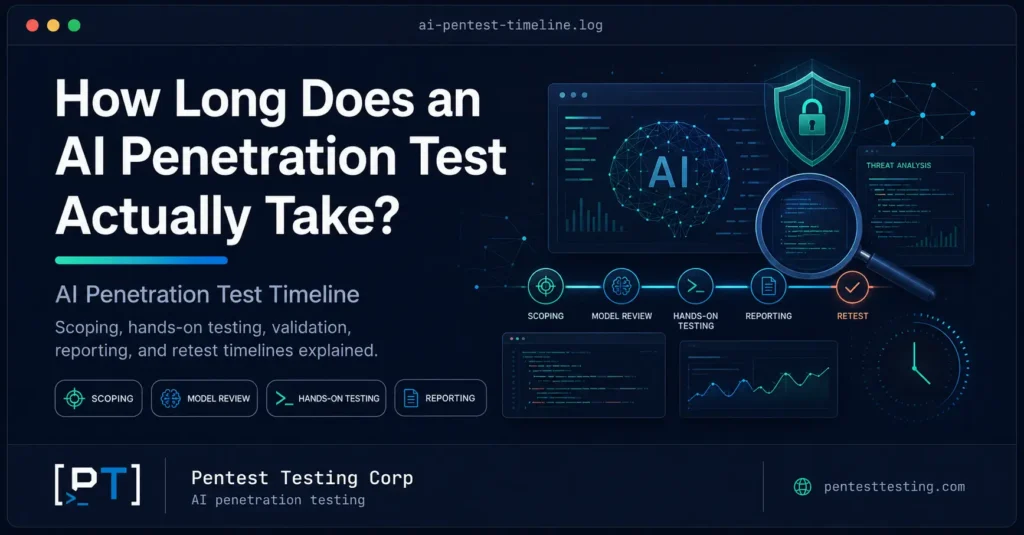
A product team ships a support copilot on Friday. It answers billing questions, summarizes account notes, and can open support tickets through an internal API. By Monday, the sales team is asking whether enterprise prospects can see an AI security report before procurement signs off. The CTO asks a simple question: how long will an AI penetration test actually take? The honest answer is not a single number. A focused chatbot assessment can move quickly. A multi-agent system with RAG, customer data, tool access, and compliance reporting needs more time because the test has to examine more than prompts. The AI penetration test timeline depends on what the system can access, what it can do, who uses it, and what evidence your auditors or customers expect to see. This guide breaks down realistic timelines, the scoping factors that move them, and how to prepare so the engagement does not lose a week to avoidable access issues.
Quick answer: how long does an AI penetration test take?
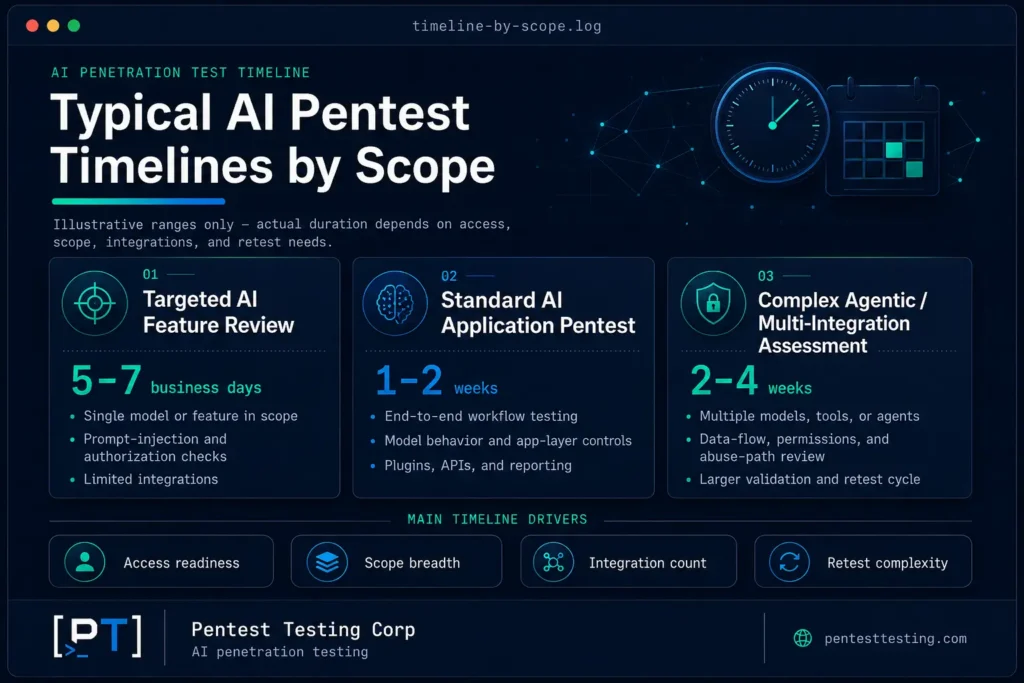
For most commercial systems, a practical AI penetration test timeline runs from 5 to 25 business days from kickoff to final report. That does not include the time your team spends fixing issues before a retest.
A small chatbot or LLM API integration usually takes 5 to 8 business days once access is ready. A RAG-powered copilot or AI feature with backend integrations often takes 10 to 15 business days. A complex agentic system, especially one that can call tools, modify records, or process regulated data, commonly takes 15 to 25+ business days.
Those ranges assume clear rules of engagement, working test accounts, a stable staging or production-safe environment, and a defined scope. The clock changes when the system has multiple roles, cross-tenant data boundaries, several agents, retrieval pipelines, fine-tuned models, or compliance mapping requirements.
The reason is simple: AI security testing does not only ask, "Can a user send a malicious input?" It asks what happens after the model interprets that input. Can it retrieve data? Can it call a tool? Can it influence another service? Can it cross a tenant boundary? Can it produce output that downstream systems trust too much?
That is why scoping matters. A standard web application pentest is usually sized around pages, endpoints, roles, and authentication complexity. An AI pentest is sized around model behavior, retrieval sources, prompt boundaries, output handling, agent permissions, and the business impact of actions the AI can trigger. Pentest Testing Corp's AI penetration testing service is built around that difference: manual adversarial testing of AI systems, not a web scanner with an AI label attached.
Before estimating the timeline, confirm exactly what the assessment includes. An AI pentest may cover prompt injection, retrieval-augmented generation, agent tools, authorization boundaries, sensitive data exposure, output handling, and monitoring, but it does not automatically include a complete source-code, cloud, or compliance audit. Read our detailed guide on what an AI penetration test actually covers to define the scope and expected deliverables before scheduling the engagement.
The baseline AI pentest process
A well-run AI pentest has a predictable shape, even when the exact duration changes. The safest engagements separate scoping, access preparation, threat modeling, adversarial testing, reporting, remediation support, and retesting.
At Pentest Testing Corp, the AI pentest process typically follows seven stages.
- Scoping call and architecture review
The first step is understanding what your AI system does, what data it can reach, and what actions it can perform. This includes chatbots, copilots, RAG pipelines, agentic workflows, model APIs, vector stores, internal tools, and any backend services the AI can call. - Rules of engagement
The team defines test windows, safe limits, user roles, production constraints, excluded systems, emergency contacts, data handling requirements, and reporting expectations. This is especially important for AI agents that can send messages, update records, trigger workflows, or spend money through API calls. - Access setup
Your team provides test accounts, API documentation where applicable, staging access or production-safe test paths, sample data, system prompts if white-box testing is agreed, and any required VPN or allowlist details. - Threat modeling and test planning
The testing team maps where AI-specific risks apply. This is where the engagement aligns to the OWASP Top 10 for LLM Applications 2025, including LLM01:2025 Prompt Injection and LLM06:2025 Excessive Agency. Other categories may apply depending on the system, such as LLM02:2025 Sensitive Information Disclosure, LLM05:2025 Improper Output Handling, LLM08:2025 Vector and Embedding Weaknesses, and LLM10:2025 Unbounded Consumption. - Manual adversarial testing
This is the core testing phase. The team uses controlled, client-safe test cases to evaluate prompt boundaries, indirect instruction handling, retrieval behavior, tool invocation, authorization enforcement, output handling, data leakage, rate limits, and agent behavior across realistic multi-turn conversations. This work is intentionally manual because the highest-value AI findings usually appear in sequences, not single requests. - Reporting and readout
Findings are documented with severity, affected component, business impact, technical explanation, sanitized evidence, OWASP LLM mapping, and remediation guidance. The goal is not to create a dramatic report. The goal is to give engineering and leadership a document they can act on, and one that supports customer security reviews. - Remediation support and retest
After your team fixes the issues, a retest validates that the controls hold under the same class of adversarial pressure. Retest timing depends on fix readiness, but the validation work itself is usually shorter than the original assessment.
This process also maps naturally to the NIST AI Risk Management Framework, especially the Map, Measure, and Manage functions. A pentest does not replace AI governance, but it gives your team evidence about where implementation differs from the intended risk model.
Typical LLM pentest duration by scope
The table below gives realistic planning ranges. These are not guarantees, because every AI system is different, but they reflect the way LLM pentest duration usually changes as architecture becomes more complex.
| Engagement type | Typical duration after access is ready | Best fit | Main timeline drivers |
|---|---|---|---|
| Starter LLM baseline | 5-8 business days | Single chatbot or third-party LLM API integration with limited backend access | Prompt boundary testing, output handling, system prompt leakage checks, basic data exposure review |
| Integrated AI feature | 8-12 business days | Product copilot, internal assistant, or AI workflow connected to application APIs | Role coverage, API permissions, business logic, downstream trust in model output |
| RAG and knowledge-base assessment | 10-15 business days | RAG chatbot, document search assistant, support knowledge assistant, vector database integration | Retrieval poisoning, cross-tenant data separation, source trust, embedding and indexing behavior |
| Agentic AI assessment | 15-20 business days | AI agent with tool use, workflow automation, email, tickets, CRM, billing, or database actions | Tool permission boundaries, human approval gates, excessive agency, multi-turn manipulation paths |
| Enterprise AI red team | 20-25+ business days | Multi-agent system, regulated data, proprietary model, multiple environments, compliance reporting | Multiple agents, roles, tenants, model variants, cloud/API scope, NIST AI RMF or audit mapping |
Most delays happen before testing starts. Missing test accounts, unclear ownership of staging data, broken API credentials, unapproved test windows, or uncertainty about whether production can be touched will stretch a five-day assessment into two calendar weeks. That is not because the testing itself doubled. It is because the engagement is waiting on decisions.
What moves the AI penetration test timeline?
1. Number of AI systems in scope
One chatbot is not the same as five specialized agents that hand work to each other. Each system has its own prompt boundaries, permissions, context sources, and failure modes. When agents interact, the number of test paths grows quickly because one agent's output can become another agent's input.
The scope should name each AI component clearly. "Our AI feature" is too broad. Better scoping language looks like this: customer support chatbot, internal policy copilot, sales email assistant, RAG knowledge assistant, billing action agent, and admin workflow agent.
2. Tool access and agency
The largest timeline multiplier is not the model. It is what the model can do.
A read-only chatbot that answers questions has a narrower blast radius. An agent that can query customer records, create support tickets, send outbound messages, update account fields, approve refunds, or trigger internal workflows needs deeper testing. That is where LLM06:2025 Excessive Agency becomes central. The test has to determine whether permissions are too broad, whether approval gates actually work, and whether the agent can be nudged into taking actions outside the intended business context.
3. Retrieval-augmented generation and vector databases
RAG changes the timeline because the test has to evaluate how content enters the knowledge base, how it is indexed, how retrieval is filtered, and whether one tenant's content can surface in another tenant's response.
This is not just a prompt problem. It is a data boundary problem. If uploaded documents, support tickets, web pages, or internal notes can influence responses later, the assessment has to include indirect instruction handling and retrieval trust. That maps to LLM01:2025 Prompt Injection and often LLM08:2025 Vector and Embedding Weaknesses.
4. User roles and tenant boundaries
AI systems embedded in SaaS products often inherit the same access-control risks as the main application, but with a new interface in front of them. The model may summarize, retrieve, or act through APIs that were originally built for human workflows. Testing has to confirm that tenant and role boundaries hold when requests are mediated by the AI layer.
A single-role internal assistant is faster to test than a multi-tenant customer-facing copilot with admin, manager, support, and end-user roles.
5. Black-box, gray-box, or white-box access
Black-box testing can reveal what an external user sees, but it takes longer to map the attack surface. Gray-box testing, with test accounts and architecture context, usually gives the best balance. White-box testing, with prompts, policy logic, tool definitions, and relevant implementation details, can reduce discovery time and push more effort into meaningful adversarial testing.
This is especially true for AI systems. The fastest way to waste time is forcing testers to guess whether a behavior is model-level, prompt-level, API-level, retrieval-level, or business-logic-level. Good documentation shortens that loop.
6. Compliance and reporting requirements
A technical report can be produced faster than a report designed for SOC 2 evidence, ISO 27001 control support, HIPAA vendor review, or a customer security questionnaire. Compliance-mapped deliverables need more context: what control the finding affects, why it matters to the system, what evidence supports the conclusion, and how remediation can be validated.
The testing time may not change dramatically, but reporting time does.
Traditional pentest vs AI pentest timeline drivers
| Area | Traditional web/API pentest | AI penetration test |
|---|---|---|
| Primary attack surface | HTTP routes, APIs, auth flows, business logic, infrastructure | Prompts, model behavior, retrieval, tool calls, output handling, AI-to-API integration |
| Main frameworks | OWASP Web Top 10, OWASP API Top 10, PTES, NIST SP 800-115 | OWASP Top 10 for LLM Applications 2025, NIST AI RMF, application/API frameworks where relevant |
| Timeline estimate starts with | Endpoint count, roles, auth complexity, environments | AI systems, agent count, tools, data sources, RAG, roles, safety constraints |
| Testing pattern | Request/response testing, access-control checks, input validation, configuration review | Multi-turn conversations, indirect instruction handling, retrieval tests, permission boundary testing |
| Common hidden delay | Missing credentials or incomplete endpoint list | Unclear tool permissions, unstable prompts, unknown data sources, unsafe production workflows |
| Retest focus | Confirm patched vulnerabilities no longer reproduce | Confirm guardrails, authorization, retrieval filters, and approval gates hold under similar pressure |
The two services are complementary. A web or API pentest may find broken access control in the application. An AI pentest asks whether the AI layer can reach the same function in a way the normal UI never allowed.
A sanitized example: why a two-day estimate becomes two weeks
The following scenario is illustrative only. It is not a real client case, and it omits operational details that would make it useful as an attack guide.
A SaaS company asked for a quick review of a support chatbot. At first glance, the scope looked small: one customer-facing assistant connected to a third-party LLM API. The team expected a few days of prompt testing.
During scoping, the chatbot turned out to have three backend capabilities: it could retrieve account notes, create support tickets, and request billing adjustments through an internal workflow. The product team also used a shared knowledge base built from uploaded policy documents and historical support content. Two user roles were involved: customer and support manager.
The timeline changed because the risk changed. The assessment now needed to test more than direct prompt injection. It had to evaluate whether retrieved support content could influence the assistant later, whether customer and support-manager roles were separated correctly, whether the billing workflow had a hard approval boundary, and whether the assistant could expose account notes outside the user's entitlement.
No live billing action was executed. The work used approved test accounts and safe simulation paths. The finding pattern was still meaningful: the chatbot sometimes treated a soft business rule as if it were permission to request an action repeatedly, and its retrieval layer did not consistently separate content by role. The remediation was not "make the model safer" in the abstract. It was concrete: restrict tool permissions, enforce server-side authorization before tool execution, separate retrieval indexes by access context, and add human approval for sensitive actions.
That engagement was not a two-day chatbot review. It was a proper AI security assessment because the AI was connected to real business workflows.
What should happen before kickoff?
Preparation can reduce the calendar timeline more than any testing shortcut. Before kickoff, gather these items:
- A list of AI features, agents, copilots, chatbots, and model APIs in scope.
- A simple architecture diagram showing model providers, application APIs, vector stores, tools, data flows, and user roles.
- Test accounts for each role and tenant combination.
- A description of what each agent or AI feature is allowed to do.
- Staging access or production-safe test rules.
- API documentation for tool-calling workflows, where relevant.
- Sample data that is safe to test with.
- Reporting needs, including SOC 2, ISO 27001, HIPAA, NIST AI RMF, or customer security review expectations.
- Known constraints such as rate limits, data retention rules, model cost limits, and off-limits workflows.
What does the timeline look like week by week?
Days 1-2: scoping and rules of engagement
The first two business days usually cover architecture review, objective alignment, scope boundaries, and test planning. If the system is simple and documentation is ready, this can be completed quickly. If multiple stakeholders need to approve production constraints, it can take longer.
Days 2-4: access validation and threat modeling
The testing team validates accounts, confirms role coverage, checks tool availability, reviews model and retrieval architecture, and builds a test plan against applicable OWASP LLM categories. This is where many avoidable delays surface.
Days 4-12: manual adversarial testing
For small scopes, testing may finish within this window. For RAG and agentic systems, the work can extend further. The team tests direct and indirect prompt injection, sensitive information disclosure, system prompt exposure, retrieval manipulation, output handling, excessive agency, rate limits, and tool authorization boundaries.
This phase should be controlled. The goal is to prove risk safely, not to create operational disruption.
Days 10-17: analysis and report writing
Findings are validated, deduplicated, severity-rated, mapped to OWASP LLM categories, and translated into remediation guidance. For compliance-driven engagements, this phase includes control mapping and language that auditors or procurement teams can understand.
Days 15-25+: readout, remediation support, and retest planning
The final report is delivered with a readout. The client fixes issues on its own timeline. Retesting is then scheduled once fixes are ready, commonly taking 2 to 5 business days depending on finding count and complexity.
The initial assessment establishes the baseline. Teams shipping frequent AI updates can then use a continuous AI testing engagement to route later releases to the right level of review without restarting the full project each week.
How to avoid timeline overruns
The biggest overruns are preventable. They usually come from vague scope, missing access, unclear data boundaries, unstable staging environments, and late compliance requests.
Use precise scoping language. Name the AI systems. Name the tools. Name the data sources. Name the roles. Decide whether testing happens in staging, production, or both. Clarify whether the report needs to support an auditor, enterprise customer, or internal engineering backlog.
For agentic systems, document the approval model. Which actions are read-only? Which actions create records? Which actions affect customers? Which actions require human approval? Which limits are enforced by the model prompt, and which are enforced server-side? The last question matters because prompt-level limits are guidance, not a security boundary.
For RAG systems, document the retrieval model. Where does content come from? Who can upload it? Is content indexed per tenant, per role, or globally? Are source permissions checked at retrieval time? Can untrusted content enter the same retrieval path as trusted policy content?
The better your answers, the tighter the timeline.
When is a shorter AI pentest acceptable?
A shorter engagement can make sense when the system is genuinely narrow: one chatbot, no tool access, no regulated data, no RAG pipeline, no cross-tenant context, and limited business impact if the model responds poorly. Even then, the test should cover the prompt layer, output handling, sensitive information exposure, and basic abuse cases.
A short engagement is not appropriate when the AI can take actions, access customer data, retrieve private documents, interact with internal systems, or influence regulated workflows.
When should you schedule the test?
The best timing is after the architecture is stable but before the AI feature becomes difficult to change. Testing too early produces findings against a moving target. Testing too late means every meaningful fix competes with customer commitments and release pressure.
A good rule: schedule the AI pentest when prompts, retrieval logic, tool permissions, and user roles are close to launch-ready. For enterprise sales or compliance-driven teams, schedule it early enough that the final report is ready before vendor security review, SOC 2 evidence collection, or customer procurement deadlines.
For a first AI feature, a focused assessment before launch may be enough. For a mature AI product, plan recurring testing after major changes: new tools, new agents, new data sources, model migrations, retrieval architecture changes, or expanded user permissions.
Frequently asked questions about AI penetration test timeline
How long does an AI penetration test actually take?
Most AI penetration tests take 5 to 25 business days after access is ready. A single chatbot may take 5 to 8 business days. A RAG or agentic system often takes 10 to 20+ business days. Complex enterprise environments can take longer.
What is the biggest factor in LLM pentest duration?
The biggest factor is usually what the AI can access or do. Tool access, RAG pipelines, customer data, multi-tenant boundaries, and multiple user roles increase testing time more than the model provider itself.
Is an AI pentest faster than a traditional web application pentest?
Not always. A narrow chatbot test can be faster than a large web app pentest, but an agentic AI system can take longer because testing has to cover multi-turn behavior, retrieval, permissions, output handling, and tool invocation paths.
Can testing be done in production?
Sometimes, but only under clear rules of engagement. High-risk tool actions, billing workflows, outbound messaging, and destructive operations should use staging or safe simulation paths. Production-safe validation may still be useful for confirming deployed behavior.
Does a third-party model provider reduce the timeline?
It can reduce some model-level concerns, but it does not remove your responsibility for prompts, retrieval data, tool permissions, API integrations, access control, and output handling. Most AI pentest findings appear in that integration layer.
How long does retesting take after fixes?
Retesting usually takes 2 to 5 business days once fixes are deployed and accessible. The timeline depends on finding count, severity, and whether fixes affect shared components such as authorization middleware or retrieval filters.
Duration also depends on whether the system remained materially unchanged. If the model, prompts, retrieval layer, tool inventory, permissions, or orchestration changed after the original test, use our AI pentest retesting decision guide to determine whether the work is still a narrow retest or should be rescoped as a broader assessment.
What should we prepare before requesting an AI pentest quote?
Prepare a system list, architecture diagram, user roles, tool permissions, data sources, model providers, staging details, test accounts, and reporting requirements. The better the scoping package, the faster the proposal and kickoff.
Conclusion: timeline follows risk, not the word "AI"
The right AI penetration test timeline is not based on whether your product uses an LLM. It is based on what the AI can reach, what it can change, how users interact with it, and what evidence your business needs after testing.
A narrow chatbot can be assessed quickly. A RAG-enabled copilot with customer data needs deeper review. An agent that can call tools, trigger workflows, or modify records needs enough time to test excessive agency and permission boundaries properly.
Pentest Testing Corp helps SaaS teams, AI-native companies, and regulated businesses scope AI security testing around the system they actually built. Our AI penetration testing service maps findings to OWASP LLM Top 10 categories, provides clear remediation guidance, and includes validation support so your team can prove the fixes hold.
Book a 30-minute scoping call and we will help you define the right scope, timeline, and fixed-price path for your AI assessment.