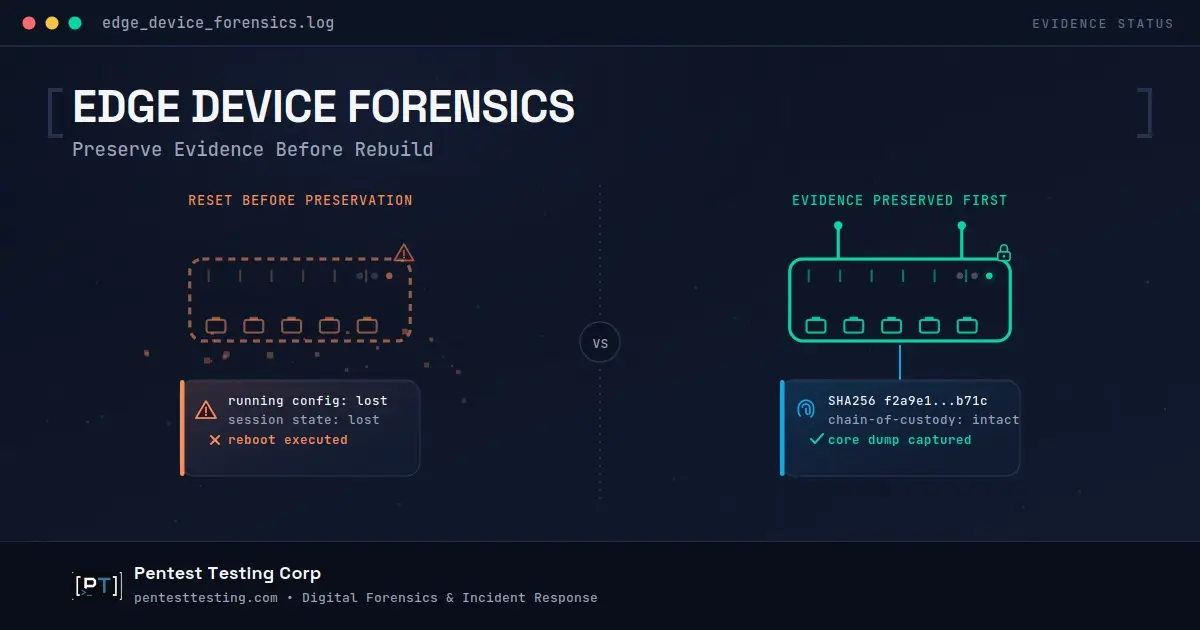
Edge Device Forensics: Preserve Evidence Before Rebuild
A regional insurer's network team gets an alert: their SD-WAN manager pushed a configuration change nobody approved. The instinct is to reboot the box, roll back the config, and move on with the day. That instinct is the single most common way organizations destroy the evidence they need most.
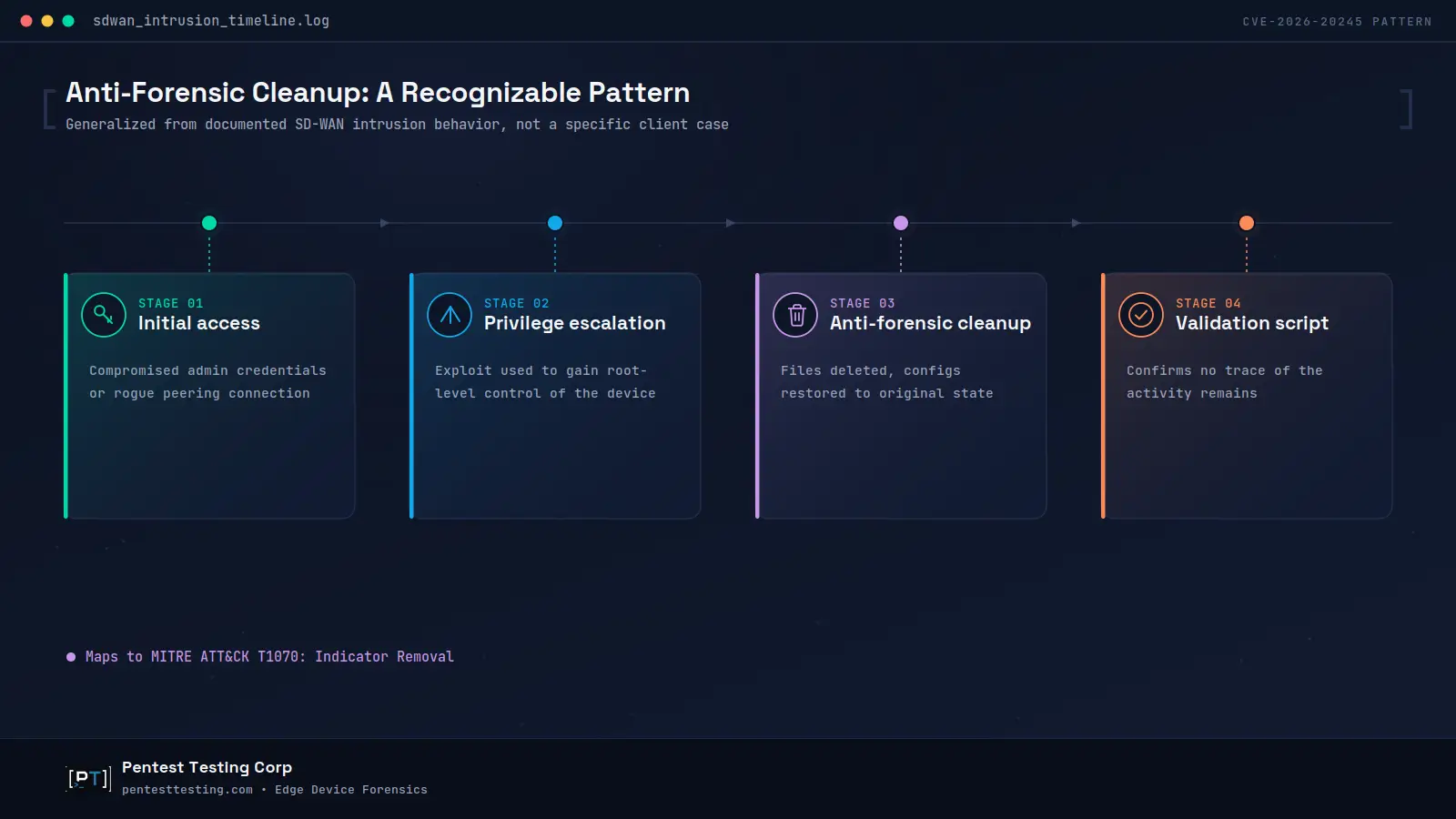
Mandiant's June 2026 report on a Cisco Catalyst SD-WAN zero-day, CVE-2026-20245, showed exactly why. The threat actor backed up configuration files before modifying them, escalated to root through a crafted upload, then deleted its own tracks and ran a validation script to confirm the cleanup had worked. A routine reboot or vendor reset would have finished that job for the attacker. This is the reality facing incident commanders today: routers, firewalls, VPN concentrators, and SD-WAN managers sit outside normal endpoint detection coverage, and the pressure to "just fix it" moves faster than the pressure to preserve evidence first.
This guide gives incident owners, CISOs, IT directors, and legal or compliance stakeholders a defensible edge device forensics checklist: what to capture before any reset, reimage, or vendor RMA, and how to decide when rebuild is actually safe. The underlying discipline is network appliance forensics applied under real time pressure, not a lab exercise.
Why Edge Devices Have Become the Preferred Entry Point
For a sixth consecutive year, exploitation of internet-facing systems remained the leading initial access vector in Mandiant's incident response caseload, accounting for roughly a third of intrusions where the entry point could be identified, according to the firm's M-Trends 2026 report. Routers, firewalls, and VPN concentrators make up a disproportionate share of that vector, and the reasons compound each other. These devices are internet-reachable by design. They rarely receive the same logging depth and change-control discipline applied to core business applications. And their vendor-controlled operating systems typically can't run a standard endpoint detection and response agent, which means the tooling most security teams rely on for visibility simply isn't present on the device that attackers are targeting.
Mandiant's own metrics show the cost of that blind spot. Global median dwell time rose from 11 days to 14 days in the most recent reporting period, a trend the firm attributes largely to a subset of adversaries establishing long-term persistence inside edge devices that lack standard telemetry. When the appliance itself is the visibility gap, "we didn't see anything unusual in the logs" stops being reassuring and starts being a data availability problem.
This isn't hypothetical for federal networks, either. CISA's emergency directive covering Cisco ASA and Firepower compromise required agencies to collect a forensic core dump and submit it for compromise analysis before taking any other remediation action, specifically because a routine reboot would not remove the malware and would destroy evidence needed to determine whether a device had already been compromised. Agencies that later confirmed no compromise were still directed to perform a hard reset by physically disconnecting power, since CISA had assessed that a soft reboot alone was insufficient. That sequence, forensic collection first, hard reset second, is the edge device forensics problem in miniature: the fix and the evidence-destruction step are frequently the same action, performed in the wrong order.
The Preservation-vs-Rebuild Trap
Every edge device incident creates the same pressure from three directions at once. The business wants connectivity restored. The vendor's advisory says to upgrade to the fixed release immediately. Whoever owns the device wants the alert to stop firing and the ticket closed. All three pressures point toward the same action: reboot, reimage, or replace the device as fast as possible.
The problem is that a compromised router, firewall, or SD-WAN controller usually holds the only copy of several evidence types that never leave the box on their own: volatile memory contents, the actual running configuration versus what's saved to disk, command history, and any indicators an attacker planted specifically to survive a reboot. Once you power-cycle the device, reflash its firmware, or accept a vendor RMA replacement, most of that evidence is gone. It cannot be reconstructed later from a SIEM export if the device wasn't forwarding rich logs to begin with, which is common for edge appliances precisely because they're treated as network plumbing rather than a system worth instrumenting.
CISA's joint guidance on protecting network edge devices, developed with international partners including the UK's National Cyber Security Centre, makes the same point from the defender's side. One component of that guidance, focused specifically on digital forensics monitoring specifications for network device manufacturers, exists because standard IT forensic assumptions simply don't hold on appliance operating systems the way they do on a Windows or macOS endpoint. NIST SP 800-61 Revision 3 and the older but still-current NIST SP 800-86 both build "preserve, then decide" into the incident response lifecycle, but that discipline is hardest to maintain exactly when a device is a production dependency and every stakeholder on the call wants it back online in minutes, not hours.
The right sequence isn't complicated, but it's easy to skip under pressure: capture what you can non-destructively, decide deliberately whether the situation calls for isolate-then-preserve or preserve-then-isolate, and only then move to rebuild, reimage, or replace. This same logic drives SD-WAN incident response specifically, where a single management-plane compromise can ripple across every connected branch site at once. When the device, the exposure window, or the potential scope is unclear, that judgment call is exactly what a structured DFIR engagement is built to make under pressure, without the conflict of interest of also being the team responsible for restoring uptime.
Edge Device Forensics: What to Preserve Before Any Reset, Reimage, or Vendor RMA
Before anyone touches the device physically or logically, a defensible edge device forensics response captures the following, roughly in order of urgency:
- Volatile state first. Running configuration, active administrative sessions, ARP and routing tables, and process or session lists where the platform exposes them. This is the first thing lost the moment the device reboots.
- A forensic core dump or vendor tech-support bundle, wherever the platform supports one. Cisco's own guidance for ASA and Firepower compromise assessment, echoed directly in CISA's emergency directive, treats a core dump as the baseline artifact to collect before any other remediation step.
- Configuration backups and their file hashes, compared against the last known-good backup to reveal unauthorized changes, deletions, or restorations. The Cisco Catalyst SD-WAN intrusion showed an attacker who restored the exact original configuration file after use specifically to defeat this kind of comparison, so timestamp and hash history across multiple backups matter, not just a single current snapshot.
- Authentication and administrative session logs: admin logins, SSH sessions, password change events, and any use of an elevated, default, or shared account, forwarded off the device wherever your architecture allows.
- Peering, VPN, or tunnel-establishment logs, since SD-WAN fabrics and VPN concentrators can be abused as a trust anchor between sites and branches long before an attacker ever touches a single endpoint.
- Firmware and boot-integrity indicators, where the platform supports secure boot or comparable validation, since ROM- or bootloader-level persistence can survive a plain reimage that only replaces the operating filesystem.
- A chain-of-custody log, recording who accessed the device, from where, at what time, and precisely what commands were run during preservation itself, since the preservation activity is also evidence.
None of this requires exotic tooling or a full-time forensics team on staff. Firewall compromise evidence in particular tends to disappear fastest, since rule and policy tables are often held only in running memory until the next scheduled save. It requires a decision, made before an incident happens, about which of these artifacts your team and your vendor's support process can actually produce on short notice, and a standing habit of pulling them before anyone reaches for the reset button.
Evidence Priority by Device Type
Different edge device classes expose different evidence, and rebuild pressure hits each one on a different timeline. Use the table below as a starting scope for planning, not a complete checklist for every vendor platform; validate specifics against your own device inventory and vendor documentation.
| Device type | Highest-value evidence | Typical rebuild pressure | Realistic preservation window |
|---|---|---|---|
| Branch or perimeter router | Running config, routing table changes, DNS redirection indicators | "The branch site is down right now" | Minutes to a few hours |
| Firewall / next-gen firewall | Rule and policy changes, admin session logs, configuration diff history | Vendor advisory says patch immediately | A few hours |
| VPN concentrator | Session logs, certificate or credential changes, tunnel establishment records | Remote workforce is locked out | Minutes to a few hours |
| SD-WAN manager or controller | Peering logs, tenant/config upload activity, root-account and password-change history | Central management outage affects many sites at once | Several hours, sometimes overnight |
| Legacy or end-of-life appliance | Whatever off-device logging already exists; on-device evidence is often unreliable | "It's end of life anyway, just replace it" | Immediate, before decommissioning proceeds |

That last row deserves its own warning. Teams that are already planning to replace devices nearing end of life often treat a suspected incident on one of those devices as a reason to accelerate decommissioning rather than slow down for evidence collection. That's backwards: an EOL device involved in a suspected compromise is exactly the device that needs preservation first, because once it's gone, there's no second chance to look at it.
Why "No Evidence Found" Doesn't Mean "Not Compromised"
Mandiant's account of the Cisco Catalyst SD-WAN intrusion is a useful caution against over-reading a device that looks clean on first review. The threat actor consistently backed up files before modifying them, restored the originals afterward, deleted every file it had created, and executed a validation script whose sole purpose was to confirm that no trace of the activity remained. This maps directly to a recognized MITRE ATT&CK defense-evasion technique, Indicator Removal, which documents exactly this kind of selective, verified cleanup rather than a wholesale wipe that would itself draw attention.
The practical consequence for buyers and incident owners: a device that looks fine after a quick log review is not the same thing as a device that has been forensically cleared. If the device sat within the exposure window for a known zero-day, or if peering, administrative, or VPN logs show anything unexplained, the absence of obvious indicators should be treated as inconclusive rather than reassuring, particularly where off-device logging was thin or nonexistent during the suspected window.
This is also why centralizing edge device log preservation matters more than most organizations currently budget for. Mandiant's M-Trends 2026 report specifically recommends extending log retention well beyond a standard 90-day window and forwarding network device administrative and application logs to centralized, long-term storage, precisely to close the gap that on-device anti-forensic cleanup is designed to exploit. A device that can't produce its own trustworthy history needs a second, independent history somewhere else. The same "capture before you patch" discipline applies at the application layer too; our first-48-hour response guidance for a recent critical SharePoint vulnerability walks through the same preserve-before-remediate sequencing for server software rather than network appliances.
Chain of Custody, Compliance, and Insurance Considerations
Edge device incidents rarely stay purely technical for long. If the affected device sits on a network in scope for HIPAA, PCI DSS, SOC 2, or a comparable framework, the question shifts quickly from "is it fixed" to "what can we show a regulator, auditor, or insurer about what happened and when." Cyber insurers increasingly expect documented evidence of investigation before covering breach-related costs, and a hashed, timestamped, chain-of-custody evidence package is what turns "we believe we contained it" into something a claims adjuster, outside counsel, or a QSA can actually act on.
This is also where the reset-first instinct creates a second, quieter cost that shows up weeks later. A device that was reimaged or replaced before evidence collection forces every downstream conversation, cyber insurance, breach notification counsel, customer disclosure, into a defensive posture, because nobody can rule compromise out with any confidence. A short, disciplined preservation window in the first hour of an edge device incident is consistently cheaper than the ambiguity that follows skipping it, even when that window feels like an unaffordable delay in the moment. If the incident also exposes broader gaps, unclear device ownership, inconsistent logging standards, missing change control, a structured risk assessment after the immediate incident closes is usually the right next step, separate from the forensic investigation itself.
What Leadership Should Decide
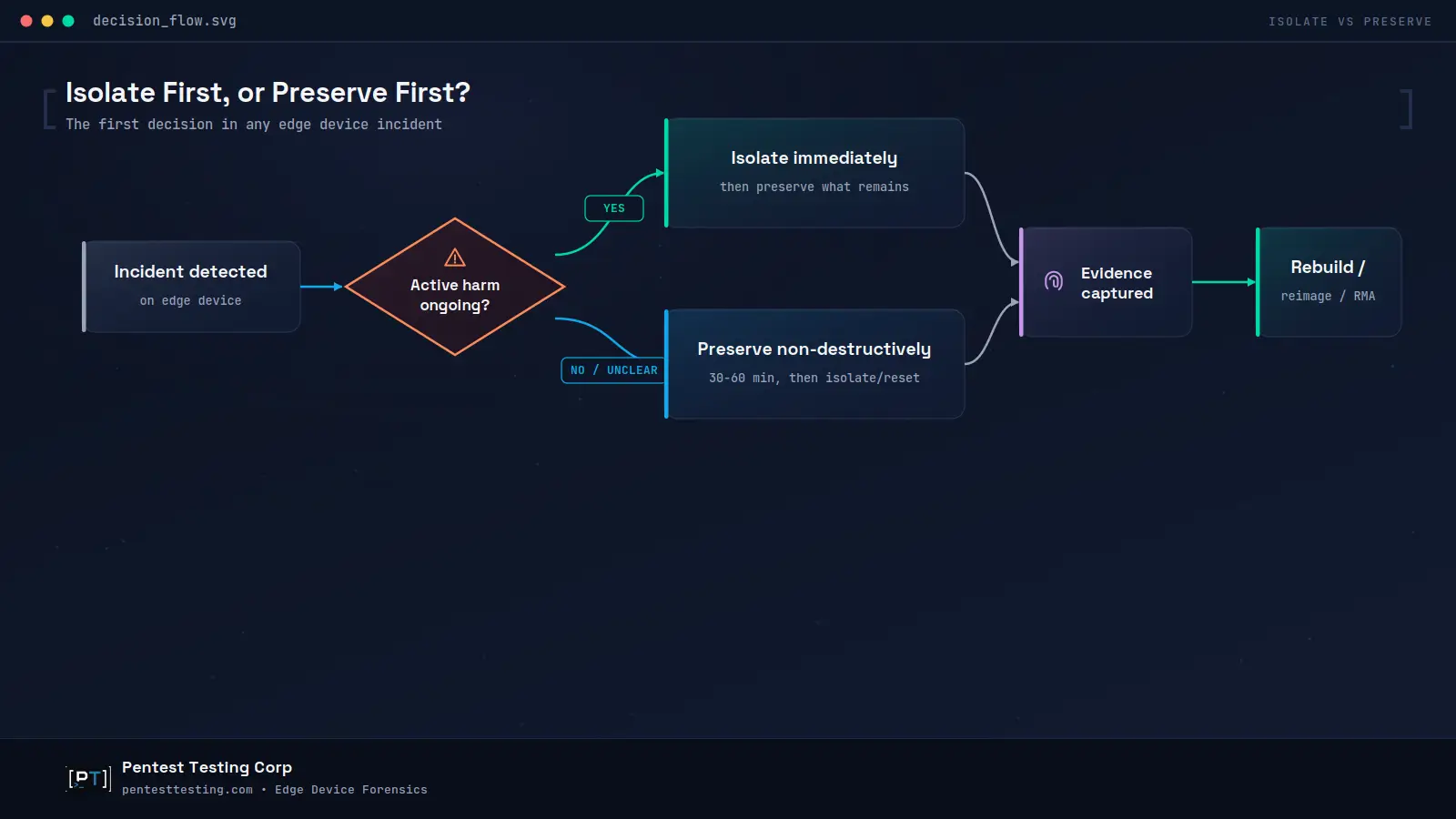
When an edge device incident surfaces, leadership and incident commanders need to make three decisions quickly, ideally as standing policy rather than improvisation under pressure:
- Isolate first, or preserve first? If there is active encryption, confirmed fraud, or clear ongoing data movement, isolate the device immediately and preserve what remains afterward. If the situation is ambiguous, spend the extra thirty to sixty minutes to preserve non-destructively before isolating or resetting.
- Who owns the preservation step, and do they have vendor support access? Many of the highest-value artifacts, core dumps, tech-support bundles, secure boot attestations, require vendor tooling or an active support case. Decide in advance who is authorized to open that case at two in the morning, and confirm they actually have the access to do it.
- What is the threshold for escalating from internal IT response to a formal DFIR engagement? Unexplained administrative account changes, peering or VPN anomalies, indicators tied to a known zero-day, or any likely regulatory or insurance exposure are reasonable triggers to bring in outside forensic support rather than resolving the incident purely as a patching exercise.
An incident involving a vendor-operated agent creates a different evidence boundary: the customer may hold the destination logs while the vendor holds the agent trace. Our vendor AI agent DFIR playbook explains how to preserve and reconcile both sides.
Making these three decisions in advance, and documenting them as policy, is the single highest-leverage step an organization can take toward defensible edge device forensics before the next incident, not during it. Pair that policy with a hardening sprint for misconfigured edge device settings once the immediate investigation is closed, so the same exposure path doesn't produce a repeat incident.
Illustrative Scenario: A Branch Router Incident
The following is a hypothetical, sanitized scenario for illustration; it does not describe an actual client engagement.
The underlying discipline here isn't unique to network appliances. It's the same patch-to-proof sequencing many teams already use for endpoint and mobile devices, applied to a device class that's usually left out of the playbook. A mid-size logistics company's network operations team notices a branch router pushing DNS settings that don't match its standard template. Under time pressure, the on-call engineer's first instinct is to reboot the device to "clear whatever's wrong" and reapply the golden configuration from the change management system. That single action would erase the running configuration, any in-memory session state, and the command history that could have shown whether the change originated from a compromised administrator account or from an attacker with direct device access.
A preservation-first response instead pulls a configuration backup and its hash, exports whatever authentication and session logs are available, checks the device's tech-support or core-dump capability, and documents who is touching the device and when, all before the reboot happens. Only once that evidence is captured does the team roll back the configuration and bring the branch site back online. The difference in operational outcome is minimal; the branch gets fixed either way, on roughly the same timeline. The difference that matters is whether the organization can later tell its insurer, auditor, or legal counsel what actually happened, backed by evidence rather than a best guess reconstructed from memory.
Frequently asked questions
What's the very first thing to do when we suspect an edge device is compromised?
Before rebooting, resetting, or accepting a vendor replacement, capture what you can non-destructively: running configuration, active sessions, and a vendor-supported core dump or tech-support bundle if the platform offers one. Isolate immediately only if there is active, ongoing harm such as data exfiltration in progress.
Is rebooting a compromised router or firewall always a bad idea?
Not always, but it should be a deliberate decision rather than a reflex. If there is active encryption or confirmed ongoing data movement, isolating quickly may outweigh a longer preservation window. In most other cases, a short preservation step before reboot preserves your options without meaningfully increasing operational risk.
Can a vendor RMA or hardware replacement destroy evidence we'd need later?
Yes. Once a device is replaced or its firmware is reflashed, on-device evidence is generally unrecoverable. Capture configuration backups, logs, and any available core dump before initiating an RMA or replacement, and document the device's observed state beforehand.
How is this different from general DFIR for laptops or email accounts?
Edge devices run vendor-controlled operating systems that rarely support standard endpoint detection agents, so evidence collection depends on vendor-specific tooling such as core dumps and tech-support bundles rather than standard forensic disk imaging. The preservation window is also often shorter, because these devices are shared infrastructure under immediate pressure to restore service. For account and endpoint-focused incidents, our triage guidance for suspected Windows, macOS, and email compromise covers the equivalent preservation steps for that device class.
Do we need penetration testing after an edge device incident, or is DFIR enough?
DFIR answers what happened and produces the evidence that supports containment and reporting. Once the incident is contained, validation testing, segmentation checks, VPN policy review, and external exposure re-scans, confirms the fix actually closed the gap and didn't quietly introduce a new one.
What if the device is already end-of-life and we were planning to replace it anyway?
Preserve evidence before decommissioning, not after. An end-of-life device involved in a suspected incident should go through the same preservation steps as any other edge device before it's powered down or physically removed, since decommissioning without preservation forecloses the investigation permanently.
How long should we retain edge device logs to support this kind of investigation later?
Longer than most organizations currently do by default. Current industry guidance points toward extending retention well past a standard 90-day window and centralizing network device administrative and application logs, since on-device logs are frequently the first artifact an attacker's cleanup script is designed to remove.
Is this something our internal IT team can handle, or do we need outside DFIR support?
Straightforward cases, a single isolated device, clear scope, no regulatory exposure, can often be handled internally with a documented preservation checklist. Bring in outside DFIR support when you see unexplained administrative or peering activity, indicators tied to a known zero-day, multi-device or multi-site scope, or any likely insurance, legal, or regulatory reporting requirement.
Edge Device Forensics: The Bottom Line
Edge devices sit at exactly the point where operational pressure and evidentiary value collide: the box everyone wants back online in minutes is often the only place certain evidence exists at all. The organizations that come out of a router, firewall, VPN, or SD-WAN incident with a defensible story are the ones that treat preservation as a fixed first step, not an optional one, before anyone reaches for a reboot, a reimage, or a vendor RMA.
Once the investigation closes, pair the findings with a remediation plan that closes the underlying gap rather than treating the reset as the end of the response.
If you're facing a suspected edge device compromise right now, or want a preservation and escalation runbook in place before the next one, our DFIR team can help you scope it quickly and confidentially.
Start a remote DFIR triage or book a 15-minute scoping call.