Mobile Logout Security Testing for Shared Devices
Consider a healthcare product owner preparing shared tablets for a new shift workflow. A clinician finishes a visit, taps logout, and hands the device to a colleague. The sign-in screen appears. Release QA records a pass. Nobody has checked the downloaded attachment, the offline draft waiting to synchronize, or the notification that arrives after the next account signs in.
Mobile logout security testing asks what remains accessible and what can still happen after that handover. The same question applies to retail terminals, field-service phones, warehouse devices, and customer-facing tablets. A successful screen transition does not establish that the previous user's data and authority have ended.
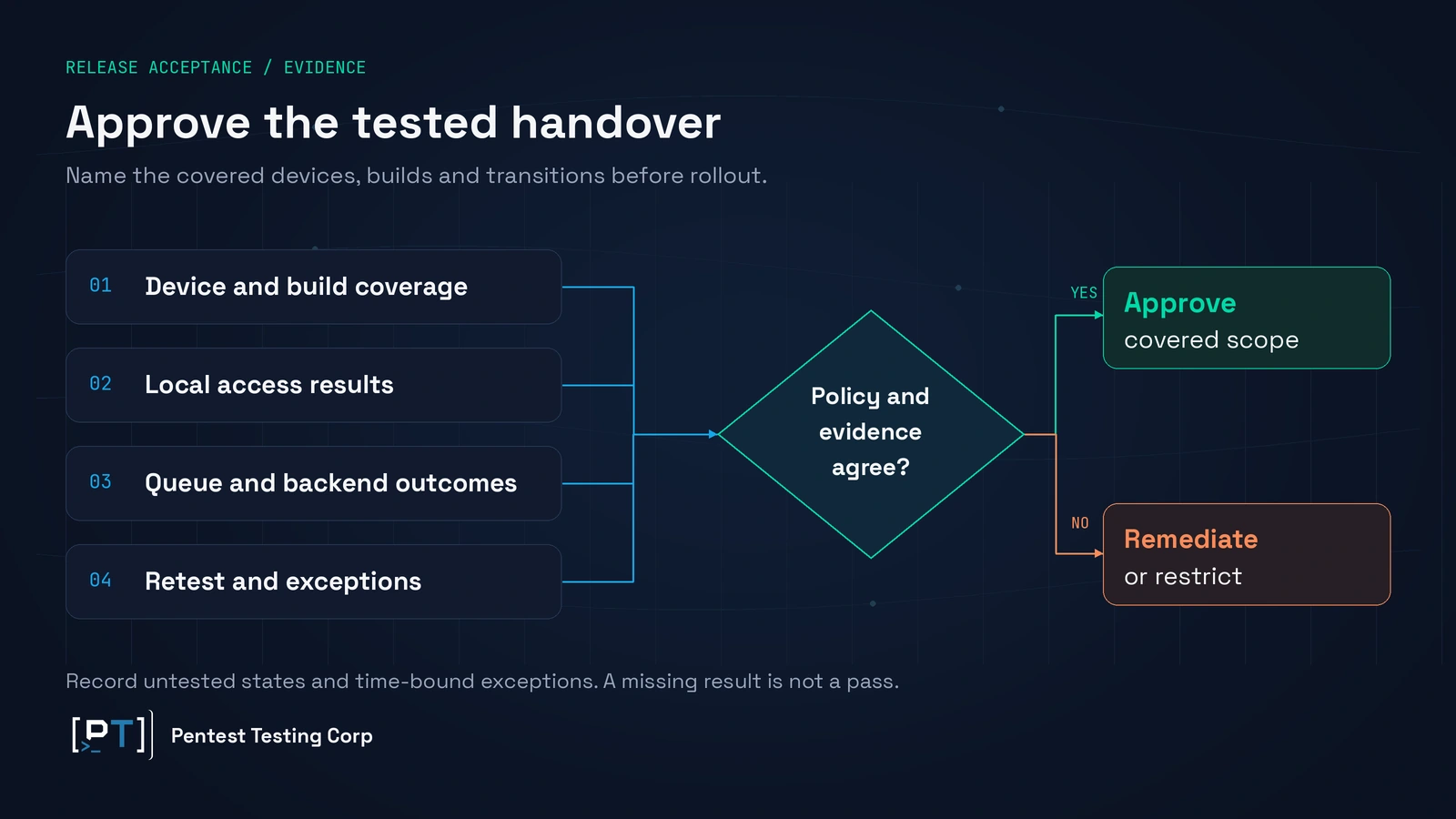
Before rollout, leadership needs an approved policy for local information, disconnected use, delayed work, and account switching. Testing should then demonstrate those outcomes on named builds and devices, with backend evidence where authority crosses the network. The release decision depends on that coverage, rather than the presence of a logout button.
Define what mobile logout security testing must prove
Start with the promise made to the person handing over the device. Does logout mean that the next person cannot view the previous account's information? Does it also mean that no pending action will complete? Are other signed-in devices affected? These are separate product decisions, and a single success message can conceal disagreement between them.
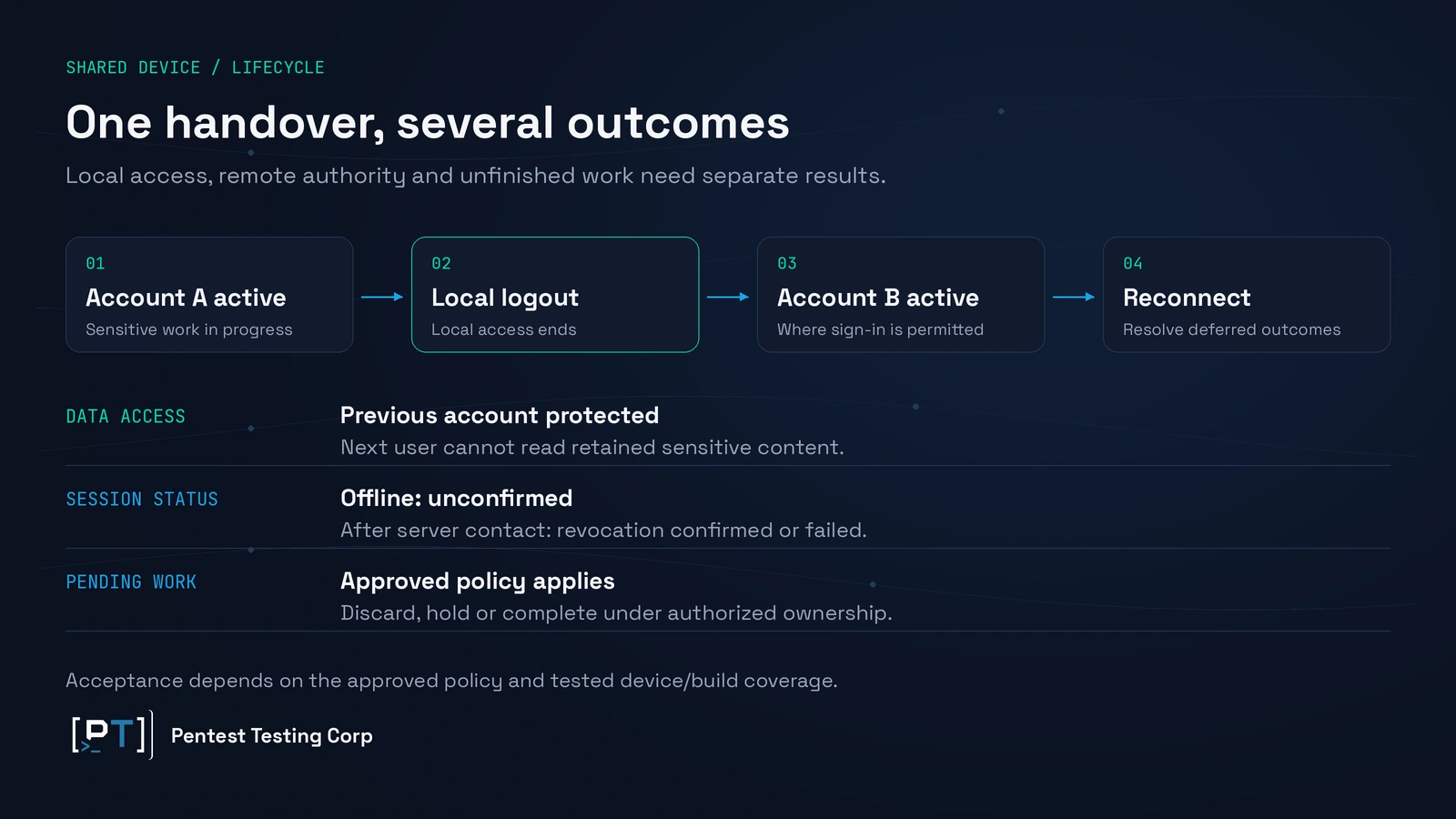
For a shared-device deployment, agree on three outcomes: local access ends, backend authority follows the approved session policy, and unfinished work reaches a controlled state. Each needs its own evidence. An app can clear its screens while leaving a valid server session, or revoke that session while leaving a readable document on the tablet.
OWASP's guidance on sensitive data after session termination recognizes that both retained information and surviving sessions matter. The buyer implication is practical: include client state and remote authorization in the same assessment, while reporting their results separately.
Encryption and device management provide useful protection, but the product still has to enforce the intended boundary when someone uses an unlocked shared device. If the application can decrypt the previous account's cache for the next user, encrypted storage alone has not established account separation. Similarly, a device lock does not necessarily identify which application account should be active.
Scope mobile application penetration testing around these business outcomes. Give the assessment team the supported platforms, sensitive workflows, account roles, and handover policy. This turns a broad request to “test logout” into a release decision with measurable conditions.
Keep the boundary with authentication projects clear. Passkey lifecycle testing addresses enrollment, sign-in assurance, fallback, and related identity transitions. Strong sign-in remains valuable, but it does not decide what a previously authenticated app retains when the next worker takes over.
Inventory the information that can outlive the screen
Ask the product team for a data inventory organized by business purpose, owner, storage location, retention rule, and logout outcome. Include cached records, images, downloaded reports, attachments, drafts, search results, account labels, authentication material, and pending transactions. Classify the sensitivity of each item before deciding what must disappear.
Some retained material may be acceptable. Public reference content or a non-sensitive language preference can improve usability without exposing the previous user. A named patient list, private customer attachment, or account-specific draft requires a stronger justification. The policy should identify what remains, who may access it, and why that access is needed.
Storage review should cover app-managed files and databases as well as secondary copies created through normal use. Temporary previews, logs, crash reporting, notifications, and app-switcher images can create different exposure routes. Their availability depends on the operating system, configuration, and application behavior, so the assessment should establish what actually occurs in the supported deployment.
Include deliberate exports. If a user saves a report outside the application's control, app logout may not remove that copy. Leadership must decide whether exporting sensitive material is allowed on shared devices and which device or workflow controls apply. Avoid telling users that logout “clears everything” when the application cannot substantiate that promise.
Retention should be tested against accessibility, not only filenames. A retained encrypted object may be acceptable if the approved next user cannot access its key or content. Conversely, removing an item from a recent-items list does not prove that the underlying file is inaccessible. The evidence should explain the access conditions and the limits of inspection.
This is also where scope discipline saves money. List which copies are controlled by the app, which depend on device management, and which leave the device entirely. The iOS and Android assessment guide provides broader platform context; this review concentrates on the information that survives an account transition.
Use a mobile logout security testing lifecycle matrix
A buyer-facing matrix connects each state change to an expected result and an evidence request. Agree it before testing. Otherwise, engineers and assessors can observe the same behavior and disagree about whether it is a defect, an intentional feature, or an unapproved exception.
| Transition | Required decision | Evidence to request |
|---|---|---|
| Online logout | Define local cleanup and the scope of session termination. | Local visibility results plus backend session and refresh outcomes. |
| Logout while offline | Block local access immediately; define how unconfirmed remote revocation is handled. | Disconnected-state results and the eventual server confirmation or recorded failure. |
| Account A switches to B | Keep records, drafts, credentials, and work ownership separated. | Results using distinct synthetic accounts, including a return to A. |
| Reconnect after handover | Decide which pending work may resume and under whose authority. | Queue disposition and backend attribution before and after reconnection. |
| App restart or device reboot | Preserve the approved logged-out state and work restrictions. | State and sensitive-content checks on the named device/build combination. |
| Remote revocation while disconnected | Set the permitted offline access window and freshness requirement. | Observed local access window and enforcement when connectivity returns. |
| Delayed notification or open link | Prevent old content or actions from bypassing the current account boundary. | Redacted display and authorization results after the transition. |
The matrix should distinguish app-account switching from operating-system user switching. Two people selecting different app accounts inside one device profile is a different deployment from separately managed OS users. Google's Android Enterprise multiple-user guidance describes managed user and session controls, but those capabilities should not be assumed to exist in every deployment.
Prioritize combinations according to sensitivity and supported use. A shared clinical tablet with offline attachments warrants different coverage from a personal phone that caches public catalog images. Record untested combinations explicitly. A clean result on one recent handset does not establish that every supported OS, management profile, and older client behaves identically.
Acceptance evidence should include expected denials as well as successful authorized use. After checking that account B cannot see account A's information, verify that B can still complete its own approved workflow. A remediation that disables the entire offline feature may close one exposure while creating an unacceptable operational failure.
Resolve offline queues and account switching before release
Disconnected operation creates a decision that the interface cannot settle alone. The device can enforce a local logout policy without contacting the backend. It cannot truthfully confirm that the server has processed a revocation request while no communication path exists. User messaging and release evidence should keep those outcomes distinct.
Agree on what happens when connectivity returns. Any deferred revocation mechanism needs a defined outcome, failure handling, and confirmation. Avoid a design that retains an ordinarily usable session merely to complete cleanup without acknowledging the resulting exposure. Backend enforcement and token lifetimes must fit the approved risk policy.
Remote revocation has the opposite limitation: the server can end authority while the disconnected device still holds previously downloaded information. Product owners should approve the maximum offline access window, any local reauthentication requirement, and how shared-device use changes those permissions. A remote action cannot be treated as proof that an offline copy has already become unreadable.
Decide the fate of unfinished work
Queued work needs more than a “cancel on logout” requirement. Separate unsent drafts, uploads already in progress, requests accepted by the backend, and server-side jobs that have already started. Cancellation has different meanings at each stage. Once an order has been accepted, local cleanup cannot by itself reverse the business transaction.
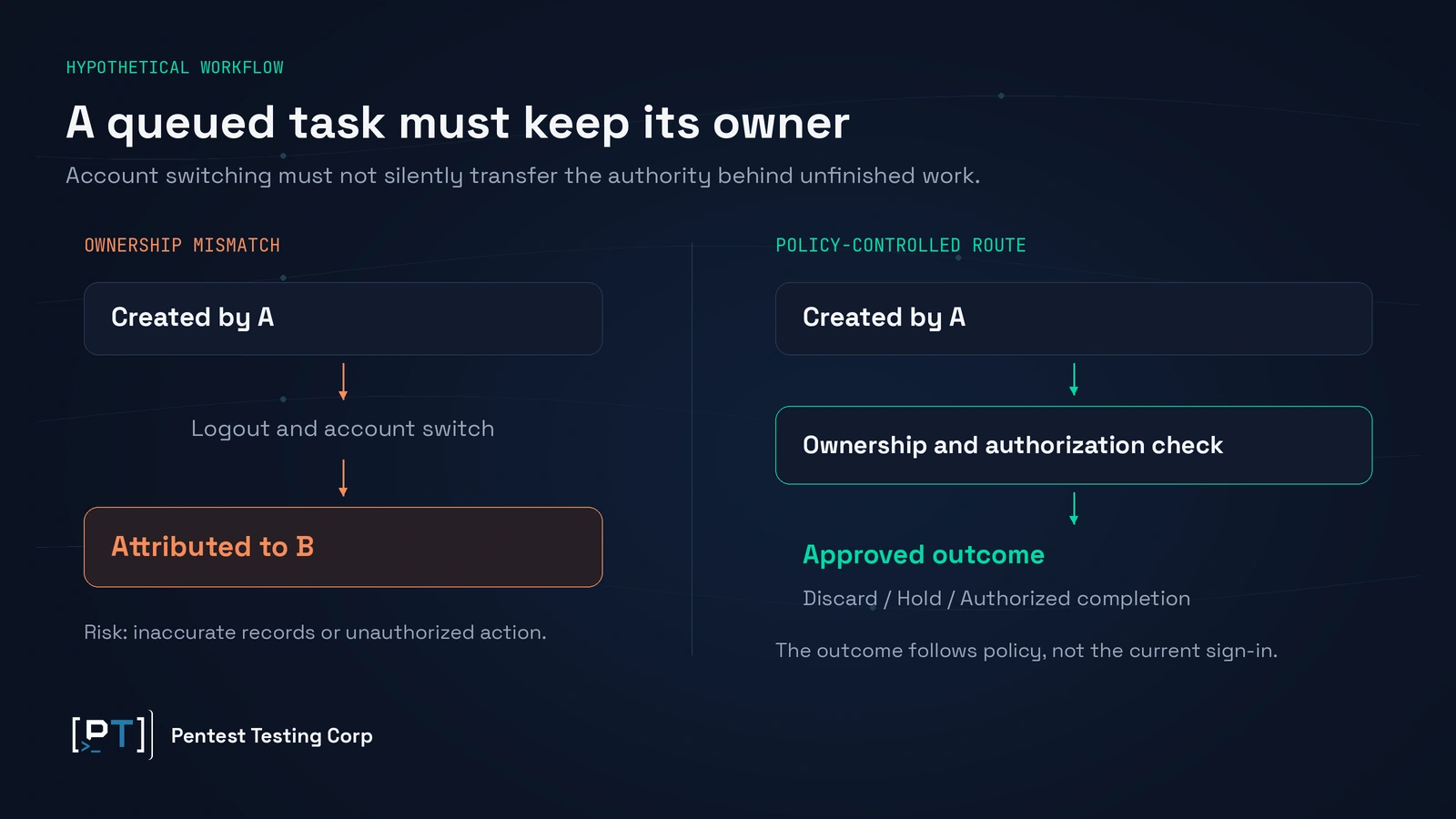
For each high-impact workflow, choose whether unfinished work is discarded, preserved for its originating user, completed under explicit prior authorization, or held for review. Make the outcome visible to that user. Silent deletion can lose important work; silent continuation can create an unauthorized or incorrectly attributed action.
Android's persistent work documentation explains that scheduled work can survive app restarts and device reboots. That capability is useful for reliable synchronization. Its presence is also a reason to assess delayed execution explicitly instead of assuming that closing the app ends every task.
Account switching must preserve ownership across those delays. Work created for A should not inherit B's current credentials, tenant, recipient, or record selection simply because B is signed in when the network returns. The backend should validate the relevant identity and permissions when it accepts the action. Audit records should distinguish the originating account from any separately authorized service processing.
Hypothetical scenario involving a shared clinical tablet
Consider a fictional care team using a shared tablet during a connectivity interruption. Clinician A downloads a visit attachment and prepares a draft update. A logs out before synchronization. Clinician B signs in, reconnects the tablet, and sees A's attachment in a recent-document view. The draft also uploads with B recorded as its author.
There are two separate failures: disclosure to the next user and inaccurate attribution of a delayed action. The consequences could include a confidentiality review, correction of the clinical record, and time spent establishing what each clinician actually approved. This illustrative scenario is not a Pentest Testing Corp client finding.
The release response should address each cause. Make retained attachments inaccessible outside their approved account context, define the draft's post-logout state, and validate its ownership at acceptance. Retest reconnection and switching back to A, as well as the immediate handover. Correcting only the recent-document screen would leave the action-integrity problem unresolved.
Scope the assessment around effort and acceptance evidence
Provide a release candidate, its version identifiers, representative devices, supported OS versions, management configuration, and test accounts with distinct permissions. Include synthetic sensitive records and realistic offline workflows. Identify backend services, notification providers, exports, and job-processing components that participate in the lifecycle.
Agree whether the team needs an additional assessment build or source review to inspect internal state. Diagnostic access can explain a defect, but final acceptance should establish the relevant behavior in the release candidate. Instrumented-device findings should state the access assumptions; do not present specialist forensic access as ordinary next-user visibility.
Effort grows with independent platform implementations, storage locations, role combinations, offline features, and delayed actions. A single-platform app with one account and no offline writes has a smaller decision space than dual-platform software supporting multiple tenants, attachments, and background synchronization. Treat those as scoping drivers, not a universal price or completion promise.
Use a staged plan: first agree policy and coverage, then assess the stable build, assign remediation, and retest the corrected release. Reserve engineering capacity for changes spanning local storage and backend processing. Ask for a fixed scope and schedule after the device/build matrix and workflow list are agreed, including how changed builds affect retesting.
A contained cache-handling fix may require less coordination than redesigning ownership across offline jobs and server acceptance. Dependencies can also sit with a third-party SDK or identity provider. The report should identify those dependencies early so procurement and release owners can distinguish a locally fixable defect from a supplier decision.
Request evidence that supports an actual decision
Require a result for each agreed transition, with platform, build, device state, account role, expected behavior, observed behavior, and relevant timestamps. Findings should connect the exposure to a business workflow, describe necessary access, and identify the responsible component. Protect the evidence itself through redaction and controlled access.
For delayed work, request a trace connecting its creation, account transition, processing decision, and final backend outcome. For local residue, ask what was readable, by whom, and through which access route. A screenshot of the login screen answers neither question. Mark unavailable backend records or untested states as limitations rather than inferred passes.
When server-session behavior needs deeper coverage, the guide to surviving tokens and revocation explains that separate scope. Keep that evidence alongside the device results without allowing a successful revocation check to substitute for local-data validation.
Map the results to the relevant mobile controls
Use MASVS-STORAGE to organize storage protection and leakage evidence. Map authentication and authorization behavior to MASVS-AUTH, selecting controls according to the mechanism tested. Apply MASVS-PRIVACY-1 to minimize access to sensitive data and resources.
Use OWASP's Mobile Application Security Testing Guide authentication guidance for supporting assessment methodology, and API2:2023 Broken Authentication where backend authentication failures are demonstrated. Queue ownership or cross-account access may require additional authorization mapping based on the actual defect. These references organize evidence; they do not constitute compliance certification or prove full MASVS coverage.
What leadership should decide before rollout
Approve a concise lifecycle policy with accountable owners. Product leadership defines what logout promises and which offline work remains useful. Engineering owns local state, job handling, and backend enforcement. Security agrees on the exposure threshold and evidence. Operations confirms that handover remains workable under real connectivity conditions.
Identify regulated or contract-restricted information before testing. A healthcare workflow may require additional privacy review, but a technical logout assessment alone does not establish compliance. The relevant data owner and compliance team should determine applicable obligations and how findings affect the release decision.
Set release blockers around business consequences: another user accessing sensitive content, work executing with the wrong authority, or an unexplained gap in revocation enforcement. Evaluate severity using demonstrated reach and access conditions. A stale public icon and a private attachment available to the next clinician should not receive the same priority.
If the deadline arrives before remediation, document the exact exception, affected builds and devices, restricted workflows, compensating controls, owner, expiry, and retest requirement. Consider limiting the shared-device rollout or disabling a sensitive offline feature where that is operationally acceptable. Confirm that the chosen restriction is enforceable rather than relying solely on user instructions.
Where the app exposes assistant or OS-invoked actions, include those paths if they participate in the same workflow. Our assessment guide for mobile actions invoked outside the app screens addresses that additional boundary. Add it because the product uses those actions, rather than expanding every logout assessment automatically.
Frequently asked questions
Can functional QA provide enough logout evidence?
QA can contribute strong evidence when it uses the agreed lifecycle matrix. Security assessment adds scrutiny of hidden retained state, authorization boundaries, and adverse transitions. Coordinate the two teams so a screen-level pass is not mistaken for coverage of storage and backend behavior.
Do shared-device tests require production patient or customer records?
Usually, representative synthetic records are preferable. They should reproduce relevant file types, sensitivity categories, roles, and workflow states without exposing real people. Any production-only verification needs separate authorization and carefully controlled data handling.
What should procurement request from a mobile software supplier?
Request tested build and OS coverage, the shared-device policy, offline queue outcomes, unresolved findings, and retest evidence. Ask which controls depend on your device-management configuration. A generic assessment letter may omit the handover behavior your deployment actually needs.
Can a logout assessment prove forensic erasure of every file?
That requires a separately defined erasure objective and suitable evidence. Ordinary logout acceptance focuses on the agreed accessibility and authority boundaries. Do not translate a cache-cleanup result into a guarantee about forensic recoverability, backups, or previously exported copies.
How should we handle an older app version still in use?
Include it if the deployment continues to support it, or document an enforceable update requirement. A corrected release does not establish closure for older installations. State any exposure that remains while the update is distributed and verified.
When should lifecycle testing be repeated?
Reassess when changes affect storage, identity, synchronization, account selection, exports, or device management. Retest affected transitions after remediation. The breadth should follow the changed boundaries and dependencies, rather than assuming every minor release needs an identical full assessment.
Approve the handover with evidence
A shared device is ready when the next person's access, the previous account's retained information, and unfinished work all follow an approved policy. Name the tested coverage, resolve material failures, and record any remaining limitation before rollout. Scope a shared-device mobile lifecycle assessment with your release build, device matrix, sensitive workflows, and offline requirements so the findings support a concrete release decision.