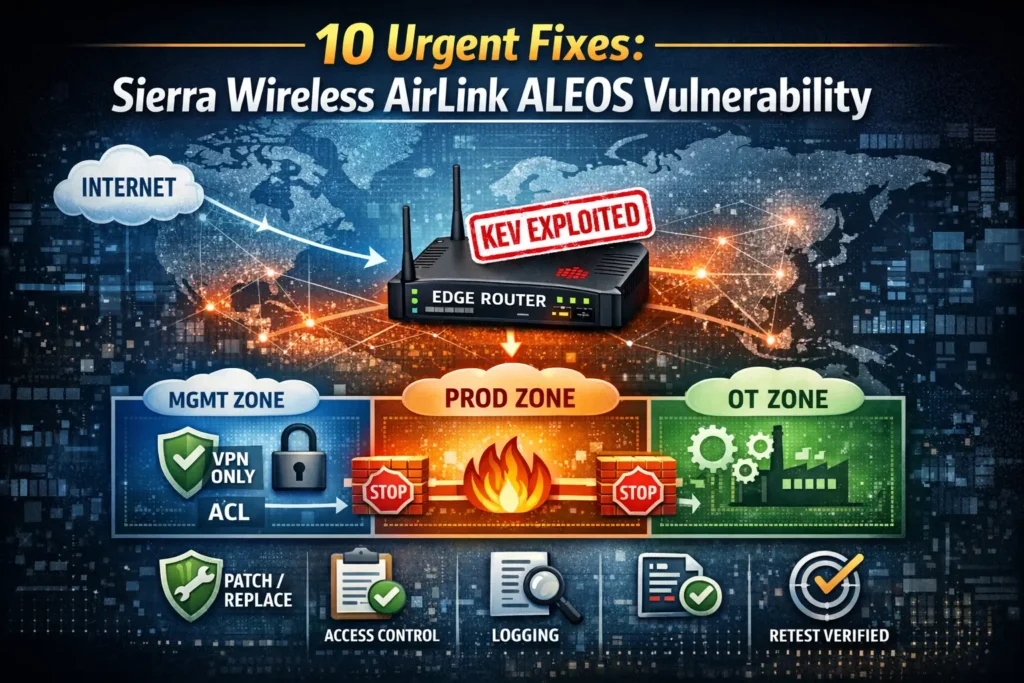
10 Urgent Steps for Sierra Wireless AirLink ALEOS RCE
CISA’s KEV addition is your signal to move fast: the Sierra Wireless AirLink ALEOS vulnerability (CVE-2018-4063) is associated with real-world exploitation and a very practical attack chain: unrestricted file upload → router RCE.
Edge routers aren’t “just networking.” They’re identity-adjacent (admin portals, VPN, remote management), data-adjacent (traffic pivot), and often forgotten (stale firmware, default rules, shared creds). This playbook is built for operators who need to: (1) scope exposure quickly, (2) contain safely, (3) harden like an auditor is watching, and (4) prove closure with retesting evidence.
Scope note: Use this only on systems you own or are authorized to test.
Related reading: React2Shell (CVE-2025-55182) Fix Steps — emergency patch playbook for React Server Components / Next.js teams: https://www.pentesttesting.com/react2shell-cve-2025-55182-fix-steps/
What happened (and why KEV-listed router RCE is a “front door” risk)
The Sierra Wireless AirLink ALEOS vulnerability is a classic edge-device problem: an attacker who can reach the management interface (or a management path behind weak segmentation) can attempt to turn a “convenience feature” into code execution. Even when an issue requires authentication, internet exposure + weak creds + shared accounts + stale access is how these become incidents.
Bottom line: treat KEV-listed edge router issues as an incident-prevention sprint, not a normal patch ticket.
The 10-step edge device hardening & containment playbook
Step 1) Rapid scoping: find AirLink/ALEOS fast (inventory first)
Start with what you already have: CMDB, NMS, VPN concentrator configs, DHCP leases, NetFlow metadata, switch MAC tables.
Quick local enumeration (Linux jump box):
# Pull ARP + neighbors (good for “what’s alive right now”)
ip neigh show | awk '{print $1}' | sort -u > ip_candidates.txt

# If you have a subnet list:
cat subnets.txt
# 10.10.0.0/16
# 172.16.20.0/24
Scan for common management surfaces (tune ports to your environment):
# Discovery scan (fast)
nmap -iL ip_candidates.txt -sS -Pn --open -p 80,443,22,23,161 -oG edge_mgmt.gnmap

# Pull probable web management endpoints
awk '/Ports:/{print $2}' edge_mgmt.gnmap | sort -u > web_targets.txt
Fingerprint likely ALEOS/ACEManager web UI (safe banner/title checks):
# Fetch titles/headers (no exploitation; just HTTP GET/HEAD)
while read -r ip; do
  for scheme in http https; do
    echo "=== $scheme://$ip ==="
    curl -k -sI --max-time 4 "$scheme://$ip/" | egrep -i "server:|www-authenticate:|location:"
    curl -k -s --max-time 4 "$scheme://$ip/" | head -n 40 | egrep -i "aleos|airlink|acemanager|sierra"
  done
done < web_targets.txt | tee fingerprint_results.txt
Evidence to save: ip_candidates.txt, scan outputs, and a short “in-scope edge device” list with owners.
Step 2) External exposure checks: prove what’s reachable from the internet
Do not guess. Test from a controlled external vantage point (your approved scanner host, security VM, or a contracted test node).
Scan only your owned public ranges (example using a text list):
# public_ranges.txt contains your owned/assigned public CIDRs
masscan -iL public_ranges.txt -p80,443,22 --rate 2000 -oL masscan_edge.txt

# Validate hits with nmap for cleaner evidence
awk '/open/{print $4}' masscan_edge.txt | sort -u > public_hosts.txt
nmap -iL public_hosts.txt -sS -Pn --open -p80,443,22 -oN public_validation_nmap.txt
Cloud quick-win (AWS Security Groups: find 0.0.0.0/0 exposure):
aws ec2 describe-security-groups \
  --query "SecurityGroups[?IpPermissions[?IpRanges[?CidrIp=='0.0.0.0/0']]].{GroupId:GroupId,Name:GroupName}" \
  --output table
Evidence to save: “before” exposure list + screenshot/export of firewall/security-group rules.
Step 3) Immediate containment: lock down admin interfaces (allowlist/VPN-only)
Your fastest risk reduction is to remove routable access to management planes.
Control goals (in order):
- No internet-exposed management UI
- Management reachable only from VPN / jump host / admin VLAN
- Add rate limiting + MFA (where possible) + strong auth
- Block/disable unused remote management services
Example (iptables on a management gateway / reverse proxy in front of routers):
# Allow admin portal only from VPN subnet; drop everything else
VPN_SUBNET="10.99.0.0/16"
MGMT_PORT="443"

iptables -A INPUT -p tcp --dport "$MGMT_PORT" -s "$VPN_SUBNET" -j ACCEPT
iptables -A INPUT -p tcp --dport "$MGMT_PORT" -j DROP
Example (Cisco-style ACL concept):
permit tcp <VPN_SUBNET> any eq 443
deny   tcp any any eq 443
permit ip any any
Evidence to save: change ticket + rule diff + “from internet: blocked” test output.
Step 4) Credentials & access cleanup: rotate creds, kill stale accounts
Treat this as compromise-adjacent until proven otherwise.
Checklist:
- Disable/rename shared admin accounts
- Rotate all router admin credentials
- Remove stale accounts (vendor, former staff, integrators)
- Require unique creds per device/region (avoid “one password rules all”)
- Ensure secrets are stored in an approved vault
Evidence to save: access review record + “accounts removed” confirmation + rotation timestamp.
Step 5) Disable risky services & reduce the management feature footprint
Edge gear tends to accumulate “just in case” services (legacy protocols, remote admin channels, old telemetry).
Baseline hardening actions (device/vendor-specific):
- Disable legacy admin protocols (e.g., Telnet)
- Restrict SSH to admin subnet only
- Restrict/disable SNMP if unused (or enforce SNMPv3 + allowlists)
- Disable unused web modules/plugins/features
- Enforce TLS settings per your standard
Validation command examples (network-side):
# Confirm exposed services have shrunk (before/after compare)
nmap -sV -Pn -p- --min-rate 1000 <ROUTER_IP> -oN router_fullport_after.txt
diff -u router_fullport_before.txt router_fullport_after.txt || true
Step 6) Segmentation blueprint: separate management/data planes + restrict east-west
This is where you stop “router compromise → everything compromise.”
Target state (simple, effective):
- Mgmt VLAN: admin UI, SSH, monitoring (VPN/jump hosts only)
- Prod/Data VLAN: operational traffic only
- OT zone (if applicable): strictly controlled routes, explicit allow rules
- Egress control from edge devices: only what’s necessary (DNS/NTP/update/logging)
Example (switch VLAN concept):
VLAN 10 = MGMT
VLAN 20 = PROD
VLAN 30 = OT

- No routing from PROD/OT to MGMT
- MGMT reachable only from VPN/jump subnet
Evidence to save: network diagram + ACL matrix + approved change record.
Step 7) Patch vs replace: make the end-of-support decision explicit
Some AirLink/ALEOS deployments are on end-of-support paths or stuck on old branches. Your decision must be documented:
Decision matrix (practical):
- If vendor-supported fix exists → patch + validate
- If no supported fix or device is EoL → isolate + replace (or retire)
- If temporary risk acceptance is needed → compensating controls + expiry date + retest cadence
Mini risk-acceptance template (copy/paste):
Risk Accepted: Sierra Wireless AirLink ALEOS vulnerability exposure (CVE-2018-4063)
Reason: Vendor support unavailable / replacement lead time
Compensating Controls:
- Mgmt plane VPN-only with allowlist
- Segmentation: no PROD/OT to MGMT routing
- Egress restricted to DNS/NTP/logging only
- Weekly exposure scan + monthly targeted retest
Expiry Date: <YYYY-MM-DD>
Owner: <Name/Role>
Approver: <Name/Role>
Step 8) Detection quick wins: logs and indicators you can actually monitor
You don’t need perfect telemetry—just reliable signals.
Quick wins:
- Forward router logs to your SIEM/syslog collector
- Alert on: admin login failures, config changes, firmware changes, unexpected reboots
- Monitor: new inbound exposure (ports), unusual outbound destinations from edge segment
Example rsyslog collector config snippet:
# /etc/rsyslog.d/10-edge-routers.conf
module(load="imudp")
input(type="imudp" port="514")

template(name="EdgeFmt" type="string" string="/var/log/edge/%fromhost-ip%/%$YEAR%%$MONTH%%$DAY%.log")
*.* ?EdgeFmt
& stop
Example SIEM-style logic (pseudo):
ALERT if:
- router_admin_login_failures > threshold
- config_change event occurs outside change window
- edge_segment egress to new ASN/country spikes
Step 9) Validation: targeted retest to confirm upload/RCE paths are dead
Validation should prove three things:
- Management plane is not exposed (internet and non-admin VLANs can’t reach it)
- Firmware/mitigation state is correct (version/branch fixed or compensating controls active)
- Lateral movement is blocked (router zone can’t freely pivot into internal crown jewels)
Retest script (safe checks, no exploitation):
#!/usr/bin/env bash
set -euo pipefail

TARGETS="routers.txt"   # one IP per line
VPN_CIDR="10.99.0.0/16"

echo "[1] Port exposure snapshot"
nmap -iL "$TARGETS" -sS -Pn --open -p 80,443,22,23,161 -oN retest_ports.txt

echo "[2] HTTP management reachability check"
while read -r ip; do
  for scheme in http https; do
    code=$(curl -k -s -o /dev/null -w "%{http_code}" --max-time 4 "$scheme://$ip/")
    echo "$ip $scheme $code"
  done
done < "$TARGETS" | tee retest_http_codes.txt

echo "[3] Save evidence bundle"
tar -czf airlink_retest_evidence.tgz retest_ports.txt retest_http_codes.txt
echo "OK: airlink_retest_evidence.tgz"
If you need deeper validation, do it as an authorized targeted pentest with a defined scope and change window.
Step 10) Evidence pack: make it audit-friendly (tickets → configs → retest proof)
Auditors and leadership want a single story: exposure → action → verification → residual risk (if any).
Suggested evidence folder structure:
/KEV-AirLink-ALEOS-CVE-2018-4063/
  01-scope/
  02-containment-changes/
  03-credentials-access-review/
  04-segmentation-acl-diagrams/
  05-patch-or-replace-decision/
  06-monitoring-alerts/
  07-retest-results/
  08-risk-acceptance (if needed)/
Evidence manifest builder (hash everything for integrity):
# evidence_manifest.py
import hashlib, json, os, time

ROOT = "KEV-AirLink-ALEOS-CVE-2018-4063"
manifest = {"generated_at": time.strftime("%Y-%m-%dT%H:%M:%SZ", time.gmtime()), "files": []}

def sha256(path):
    h = hashlib.sha256()
    with open(path, "rb") as f:
        for chunk in iter(lambda: f.read(1024 * 1024), b""):
            h.update(chunk)
    return h.hexdigest()

for base, _, files in os.walk(ROOT):
    for name in files:
        p = os.path.join(base, name)
        manifest["files"].append({
            "path": p.replace("\\", "/"),
            "sha256": sha256(p),
            "bytes": os.path.getsize(p)
        })

with open("evidence_manifest.json", "w", encoding="utf-8") as f:
    json.dump(manifest, f, indent=2)

print(f"OK: evidence_manifest.json ({len(manifest['files'])} files)")
Where Pentest Testing Corp can help (scope → harden → prove closure)
If you need a fast, defensible workflow:
- Start with a risk assessment to prioritize what’s exposed and business-critical:
https://www.pentesttesting.com/risk-assessment-services/ - Execute remediation + hardening + retest evidence as a single closure package:
https://www.pentesttesting.com/remediation-services/ - Validate edge exposure safely with an external network pentest:
https://www.pentesttesting.com/external-network-pentest-testing/
Free Website Vulnerability Scanner tool page

Sample report screenshot to check Website Vulnerability

Related reading from our blog
If you’re building a repeatable KEV response program, these pair well with this playbook:
- https://www.pentesttesting.com/cisa-kev-remediation-sprint-in-30-days/
- https://www.pentesttesting.com/shrink-your-supply-chain-attack-surface/
- https://www.pentesttesting.com/risk-register-remediation-plan/
- https://www.pentesttesting.com/compliance-risk-assessment-remediation/
- https://www.pentesttesting.com/multi-tenant-saas-breach-containment/
🔐 Frequently Asked Questions (FAQs)
Find answers to commonly asked questions about Sierra Wireless AirLink ALEOS Vulnerability.