9 Powerful Patch Evidence Pack Moves for Audit Proof
Patch Tuesday hits. Mobile bulletins drop. Your team scrambles, patches “most things,” and moves on.
Then an auditor asks a simple question:
“Show me proof.”
Not “tell me you patched,” but evidence—what was in scope, why you prioritized, what changed, how you validated, and how you handled exceptions. That’s where most SMBs get stuck.
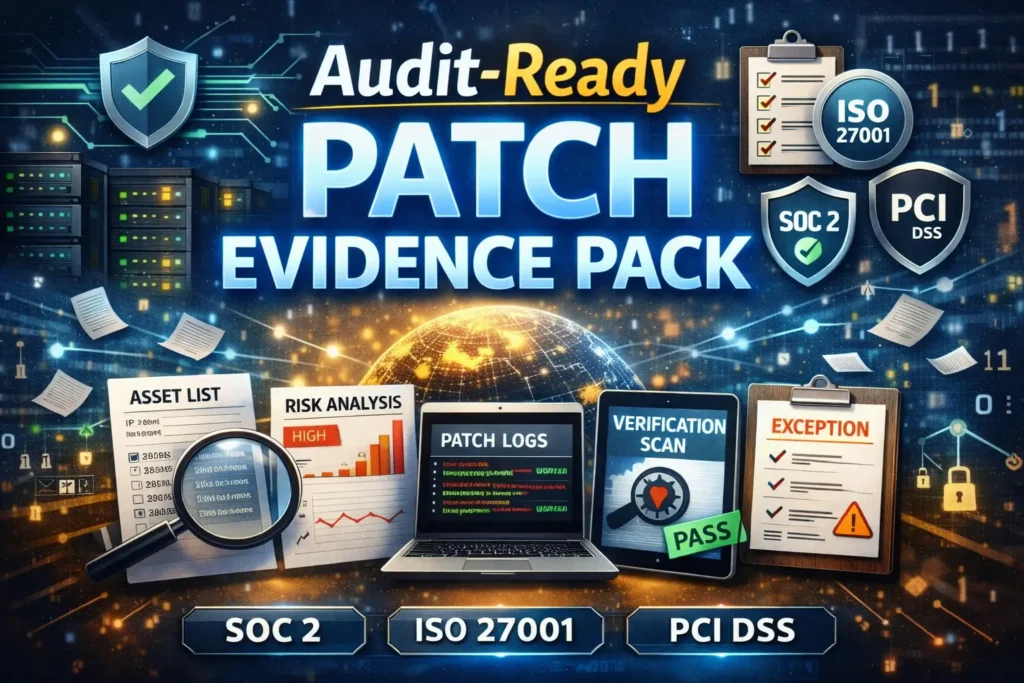
This guide shows how to build an audit-ready Patch Evidence Pack you can generate every month (and during hot fixes) to support SOC 2, ISO 27001, and PCI expectations—without turning your patch cycle into paperwork.
If you want help operationalizing this across your environment, start with a baseline risk assessment and then close gaps with structured remediation support:
- Risk Assessment Services: https://www.pentesttesting.com/risk-assessment-services/
- Remediation Services: https://www.pentesttesting.com/remediation-services/
What auditors actually want: the 5 artifacts
When audits get uncomfortable, it’s usually because one of these five artifacts is missing or inconsistent. Your Patch Evidence Pack should include all five—every cycle.
1) Asset scope (what was in scope—and why)
- Asset inventory slice (servers/endpoints/network devices/mobile fleets)
- Ownership + environment tags (prod/dev)
- Patch policy scope statement (what “must patch” means)
2) Risk decision (why you prioritized what you did)
- Bulletin summary + severity/impact
- Exposure context (internet-facing? privileged systems? regulated data?)
- Due dates aligned to policy
3) Remediation proof (what you changed)
- Change ticket(s), approvals, change window
- Patch deployment logs / package manager history
- Before/after version evidence (OS build, package versions, firmware version)
4) Validation (how you proved it worked)
- Post-change verification checks (installed KBs/packages, device compliance)
- Vulnerability verification scan outputs (targeted, non-disruptive)
- Spot-check evidence on a sample set + 100% coverage for critical assets
5) Exception handling (what you couldn’t patch—and how you controlled it)
- Exception register (EOL, vendor constraints, business constraints)
- Compensating controls (segmentation, allowlisting, WAF, monitoring)
- Risk acceptance + review date
New playbook: If you’re struggling to prioritize fixes beyond CVSS, this guide shows how SMBs can run KEV-driven vulnerability management using a 7-day exploit-first sprint—including a practical SLA table, proof-pack templates, and automation examples.
Read it here: https://www.pentesttesting.com/kev-driven-vulnerability-management-sprint/
Move #1: Standardize a Patch Evidence Pack folder (auditor-friendly)
Create a repeatable structure so every month looks the same.
Patch-Evidence-Pack/
  2026-01_Patch-Tuesday/
    00_Scope/
      asset_scope.csv
      asset_scope.json
    01_Bulletins_and_Triage/
      triage_summary.md
      risk_matrix.csv
    02_Change_Tickets/
      CHG-10291.yaml
      approvals_screenshots/
    03_Deployment_Proof/
      windows_kb_installed.csv
      linux_packages_installed.csv
      macos_updates.txt
      mdm_compliance_export.csv
    04_Validation/
      verification_checks.md
      vuln_verification_scan_results/
      screenshots/
    05_Exceptions/
      exceptions_register.csv
      compensating_controls.md
    06_Integrity/
      sha256_manifest.txt
      README.md
Why this matters: auditors love consistency. A predictable pack reduces questioning and follow-ups.
Move #2: Use one “Patch Evidence Ticket” template (copy/paste ready)
Whether you use Jira, ServiceNow, Azure DevOps, or a shared mailbox—force the same fields.
Patch Evidence Ticket template (YAML)
ticket_id: CHG-10291
cycle: "2026-01 Patch Tuesday + Mobile Bulletins"
owner: "IT Ops"
approver: "Security"
systems_in_scope_ref: "00_Scope/asset_scope.csv"

triage:
  bulletin_sources:
    - "OS monthly security updates"
    - "Mobile OS security bulletins"
    - "Third-party application updates"
  risk_summary: "High - patching for internet-facing endpoints and privileged jump hosts first"
  due_date_policy: "Critical within 72 hours; High within 14 days"

change_window:
  planned_start: "2026-01-14T01:00:00Z"
  planned_end: "2026-01-14T04:00:00Z"
  rollback_plan: "Snapshots + package rollback where supported"

deployment_proof:
  windows: "03_Deployment_Proof/windows_kb_installed.csv"
  linux: "03_Deployment_Proof/linux_packages_installed.csv"
  macos: "03_Deployment_Proof/macos_updates.txt"
  mobile_mdm: "03_Deployment_Proof/mdm_compliance_export.csv"

validation:
  spot_check_method: "Random sample + all critical assets"
  verification_notes: "04_Validation/verification_checks.md"
  scan_results_dir: "04_Validation/vuln_verification_scan_results/"

exceptions:
  register: "05_Exceptions/exceptions_register.csv"
  compensating_controls: "05_Exceptions/compensating_controls.md"

integrity:
  sha256_manifest: "06_Integrity/sha256_manifest.txt"
Move #3: Build scope evidence automatically (asset slice you can defend)
Even if you have a CMDB, auditors need to see what you considered in scope for that cycle.
Convert an inventory CSV into a time-stamped JSON snapshot
# build_scope_snapshot.py
import csv, json
from datetime import datetime, timezone

INFILE = "00_Scope/asset_scope.csv"
OUTFILE = "00_Scope/asset_scope.json"

with open(INFILE, newline="", encoding="utf-8") as f:
    rows = list(csv.DictReader(f))

payload = {
    "generated_at": datetime.now(timezone.utc).isoformat(),
    "count": len(rows),
    "assets": rows,
}

with open(OUTFILE, "w", encoding="utf-8") as f:
    json.dump(payload, f, indent=2)

print(f"OK: wrote {OUTFILE} ({len(rows)} assets)")
Recommended columns for asset_scope.csv:
asset_id,hostname,ip,os,owner,env,criticality,exposure,patch_group,last_seenMove #4: Capture Windows patch proof in one command set (PowerShell)
Export installed updates (KBs) + OS build evidence
# windows_patch_evidence.ps1
$OutDir = "03_Deployment_Proof"
New-Item -ItemType Directory -Force -Path $OutDir | Out-Null

# OS version/build
Get-ComputerInfo | Select-Object OsName, OsVersion, OsBuildNumber, WindowsVersion |
  Export-Csv "$OutDir\windows_os_build.csv" -NoTypeInformation

# Installed hotfixes (KBs)
Get-HotFix | Select-Object InstalledOn, HotFixID, Description, InstalledBy |
  Sort-Object InstalledOn -Descending |
  Export-Csv "$OutDir\windows_kb_installed.csv" -NoTypeInformation

# Update history (where available)
try {
  Get-WinEvent -LogName "Microsoft-Windows-WindowsUpdateClient/Operational" -MaxEvents 2000 |
    Select-Object TimeCreated, Id, LevelDisplayName, Message |
    Export-Csv "$OutDir\windows_update_eventlog.csv" -NoTypeInformation
} catch {
  "WindowsUpdateClient log not available on this host." | Out-File "$OutDir\windows_update_eventlog_note.txt"
}

Write-Host "OK: Windows patch evidence exported to $OutDir"
Tip for audits: keep one sample per patch group plus 100% coverage for critical/internet-exposed systems.
Move #5: Capture Linux patch proof (apt/dnf/yum) with minimal friction
Debian/Ubuntu (APT) evidence
# linux_patch_evidence_apt.sh
OUTDIR="03_Deployment_Proof"
mkdir -p "$OUTDIR"

# Current package versions snapshot
dpkg-query -W -f='${Package},${Version}\n' | sort > "$OUTDIR/linux_packages_installed.csv"

# APT history (deployment evidence)
sudo cp /var/log/apt/history.log "$OUTDIR/apt_history.log" 2>/dev/null || true
sudo cp /var/log/apt/history.log.1.gz "$OUTDIR/apt_history.log.1.gz" 2>/dev/null || true

# Kernel version (common audit ask)
uname -a > "$OUTDIR/linux_kernel_version.txt"

echo "OK: APT patch evidence written to $OUTDIR"
RHEL/CentOS/Fedora (DNF/YUM) evidence
# linux_patch_evidence_dnf.sh
OUTDIR="03_Deployment_Proof"
mkdir -p "$OUTDIR"

rpm -qa --qf '%{NAME},%{VERSION}-%{RELEASE}.%{ARCH}\n' | sort > "$OUTDIR/linux_packages_installed.csv"

# Transaction history (proof)
dnf history > "$OUTDIR/dnf_history.txt" 2>/dev/null || yum history > "$OUTDIR/yum_history.txt"

uname -a > "$OUTDIR/linux_kernel_version.txt"

echo "OK: DNF/YUM patch evidence written to $OUTDIR"
Move #6: Capture macOS + mobile bulletin evidence (without guesswork)
macOS update proof
# macos_patch_evidence.sh
OUTDIR="03_Deployment_Proof"
mkdir -p "$OUTDIR"

# Installed updates history
softwareupdate --history > "$OUTDIR/macos_updates.txt"

# OS version/build snapshot
sw_vers > "$OUTDIR/macos_sw_vers.txt"

echo "OK: macOS patch evidence written to $OUTDIR"
Mobile devices (MDM export → audit evidence)
Most orgs already have a device compliance export (CSV) from their MDM. Don’t overcomplicate it: export compliance once per cycle and store it as-is.
Then normalize it for auditors:
# mdm_compliance_normalize.py
import csv
from collections import Counter

INFILE = "03_Deployment_Proof/mdm_compliance_export.csv"
OUTFILE = "03_Deployment_Proof/mdm_compliance_summary.txt"

with open(INFILE, newline="", encoding="utf-8") as f:
    rows = list(csv.DictReader(f))

status_counts = Counter((r.get("compliance_status") or "unknown").lower() for r in rows)
os_counts = Counter((r.get("os_version") or "unknown") for r in rows)

lines = []
lines.append(f"Devices: {len(rows)}")
lines.append("Compliance status counts:")
for k, v in status_counts.most_common():
    lines.append(f"  - {k}: {v}")

lines.append("\nTop OS versions:")
for k, v in os_counts.most_common(10):
    lines.append(f"  - {k}: {v}")

with open(OUTFILE, "w", encoding="utf-8") as f:
    f.write("\n".join(lines))

print(f"OK: wrote {OUTFILE}")
Move #7: Run the “72-hour SMB workflow” (bulletin → proof)
Here’s a simple, defensible cadence that works even with a small team.
Hour 0–8: Bulletin intake + triage
- Identify impacted asset groups (servers/endpoints/mobile/network edge)
- Tag “critical path” assets: internet-facing, privileged, regulated data flows
- Create your Patch Evidence Ticket(s)
Hour 8–24: Change planning
- Approvals + rollback plan
- Define the verification method (what “patched” means)
- Notify stakeholders of the change window
Hour 24–48: Deployment
- Patch by group (pilot → broad rollout)
- Collect deployment proof automatically (scripts above)
- Update ticket fields as you go
Hour 48–72: Verification + report pack
- Validate patch state on a sample + critical systems
- Run targeted verification scans where appropriate
- Create exception entries for anything blocked
Move #8: Add validation that auditors trust (verification checks + scans)
Validation is where teams often lose credibility: “we think it worked” is not evidence.
Minimal verification checklist (copy/paste)
# Verification Checklist (Cycle: 2026-01)

- [ ] Windows: OS build captured + KB list exported
- [ ] Linux: package snapshot + history exported
- [ ] macOS: update history exported
- [ ] Mobile: MDM export attached + summary generated
- [ ] Spot-check: 10% random sample + 100% critical assets verified
- [ ] Risk-based scan: targeted verification performed for internet-facing systems
- [ ] Exceptions: register updated with compensating controls + review date
Lightweight verification scan example (safe, targeted)
# Example: validate exposed services changed (authorized environments only)
nmap -sS -sV -Pn --open -p 80,443,22,3389,445 -iL targets.txt -oA 04_Validation/verification_ports
Add evidence from our free tool (screenshots you can use in the pack)
Even though patching is broader than web testing, auditors love clear before/after proof—especially for internet-facing assets. For web-facing systems, you can add supporting evidence using our free scanner:
Free tool page: https://free.pentesttesting.com/
Screenshot #1 (Free Website Vulnerability Scanner tool page)

Screenshot #2 (Sample report by our tool to check Website Vulnerability)

Move #9: Handle EOL devices with defensible exceptions (not excuses)
If a device can’t be patched, it’s not “fine”—it becomes an exception that must be controlled, reviewed, and time-boxed.
Exception register (CSV)
exception_id,asset_id,reason,owner,risk_level,compensating_controls,approval,review_date,planned_fix_date,status
EX-001,FW-EDGE-02,EOL vendor support ended,NetOps,High,"Mgmt allowlist; Segmentation; Enhanced logging",CISO,2026-02-15,2026-03-30,Ope
Compensating controls checklist (document it)
# Compensating Controls (EX-001)
- Segmentation: isolate device in dedicated VLAN/subnet
- Management plane: allowlist admin VPN only; deny internet access
- Monitoring: alerts on admin login, config changes, new VPN users
- Backup: daily config export + integrity hash
- Replacement plan: vendor-approved target model + timeline
For a deeper playbook on unpatchable infrastructure, see our recent post:
Make the pack tamper-evident (simple integrity step)
This is a small move that makes auditors (and legal teams) much happier.
# From inside your cycle folder (e.g., 2026-01_Patch-Tuesday/)
find . -type f -maxdepth 3 -print0 | sort -z | xargs -0 sha256sum > 06_Integrity/sha256_manifest.txt
Add a short README.md explaining what the pack contains, who approved it, and how to verify integrity.
Where Pentest Testing Corp helps (fast path to “audit-ready”)
If you want this to run like a system—not a hero effort every month—pair evidence packs with structured security work:
- Build audit-ready scope, risk decisions, and testing coverage: https://www.pentesttesting.com/risk-assessment-services/
- Close gaps and validate fixes with evidence that stands up in audits: https://www.pentesttesting.com/remediation-services/
- Explore more practical playbooks: https://www.pentesttesting.com/blog/
- Security baseline and quick web validation: https://free.pentesttesting.com/
Related reading (recent posts from our blog)
Use these to extend your internal SOPs beyond patching into hardening and rapid response:
- Replace EOL Network Devices with 7 Urgent Steps: https://www.pentesttesting.com/eol-network-devices-replacement-playbook/
- 7 Shocking Truths: Free Vulnerability Scanner Not Enough: https://www.pentesttesting.com/free-vulnerability-scanner-not-enough/
- 48-Hour Battle-Tested SonicWall SMA1000 Zero-Day Plan: https://www.pentesttesting.com/sonicwall-sma1000-zero-day-48-hour-plan/
- 2 Critical WebKit Zero-Days: 48-Hour Patch Plan: https://www.pentesttesting.com/webkit-zero-day-48-hour-patch-playbook/
- 7 Powerful Fixes for Misconfigured Edge Devices: https://www.pentesttesting.com/misconfigured-edge-devices-hardening-sprint/
🔐 Frequently Asked Questions (FAQs)
Find answers to commonly asked questions about Patch Evidence Pack for SOC 2, ISO 27001, and PCI.